
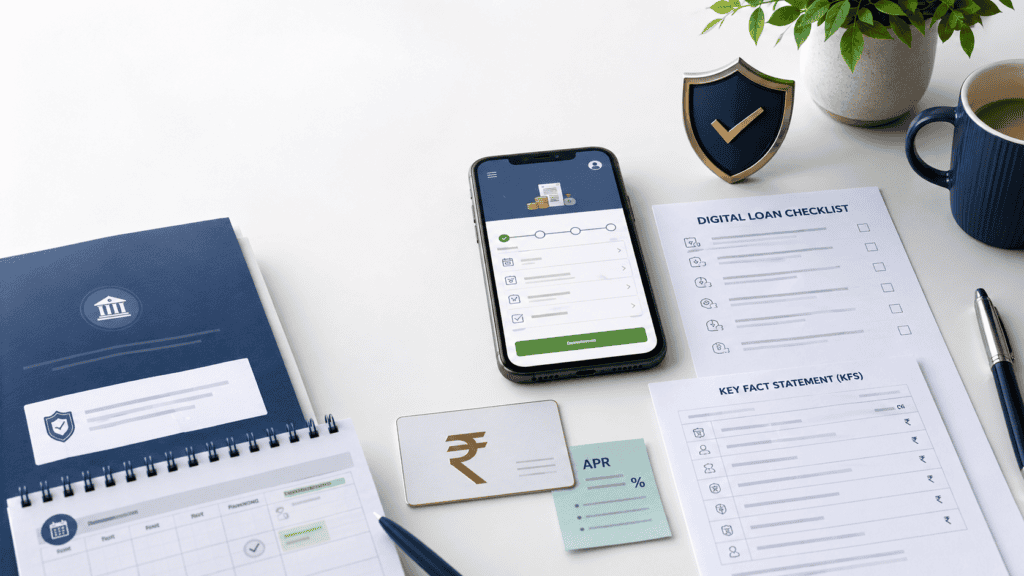
A loan app that approves ₹20,000 in three minutes sounds convenient — until you realise you do not know who is actually lending the money, why the app wants access to your contacts, or whether the EMI shown is anywhere close to the real cost. RBI digital lending rules exist precisely to fill that gap. Since the Reserve Bank of India issued its Digital Lending Directions, banks, NBFCs, and the apps they work through are required to disclose the real lender, give you a Key Fact Statement before you accept, show the Annual Percentage Rate, route repayments through regulated accounts, limit data access, and provide a named grievance officer. This article explains each of those rules in plain borrower language — what they mean, what you should see on screen, and what to do if you do not. It is written for education only; verify the current rules from RBI (rbi.org.in) and the lender before you apply.
Quick Answer: What Are RBI Digital Lending Rules?
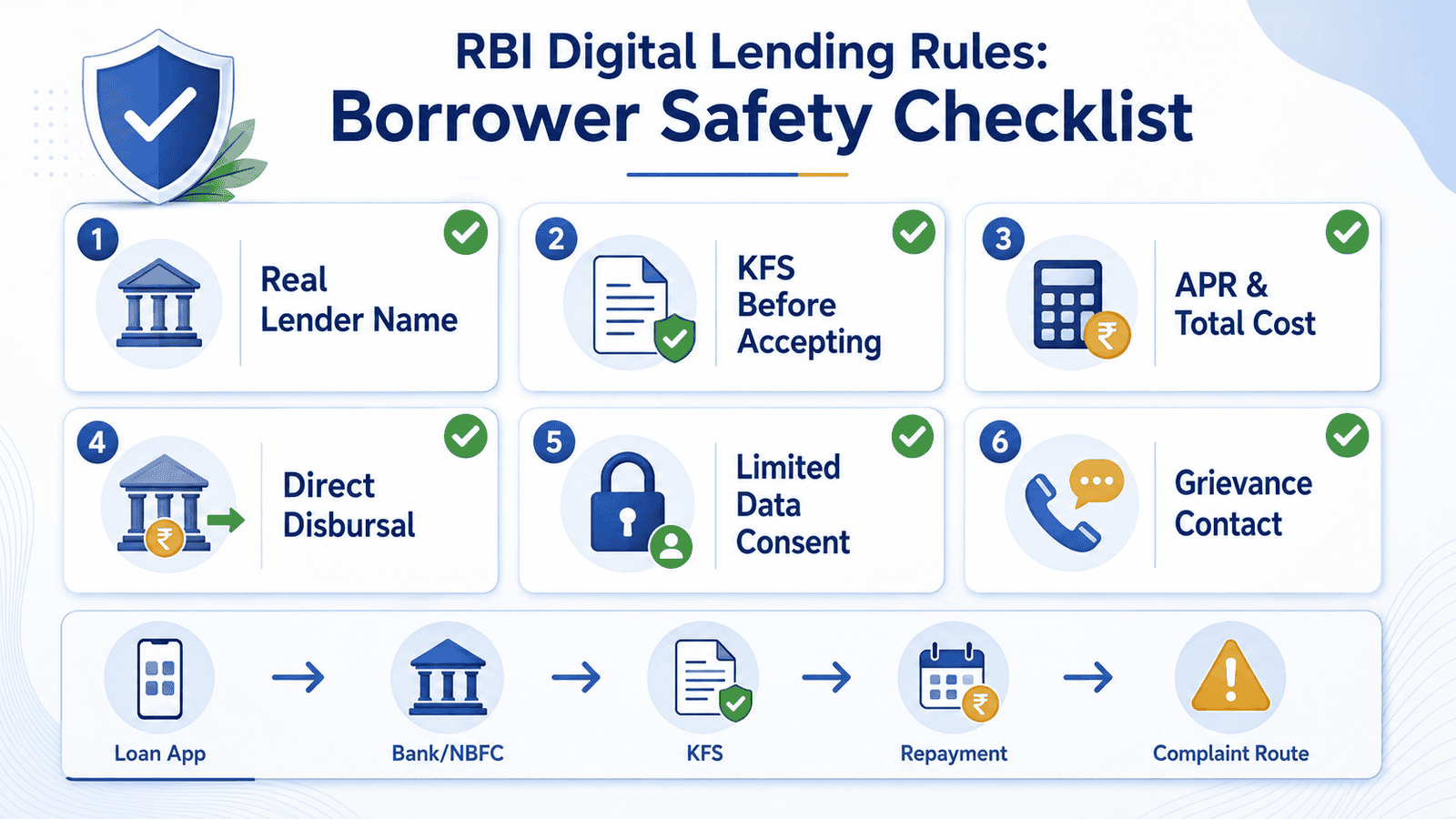
RBI digital lending rules require banks and NBFCs to disclose the real lender, provide a Key Fact Statement, show APR and major charges, route disbursal/repayment through regulated accounts, limit data access, and offer grievance redressal. Borrowers should verify KFS, permissions, and complaint options before accepting a digital loan.
Key Takeaways
- The loan app on your phone is usually not the actual lender — a bank or NBFC regulated by RBI is. Always find that lender name before accepting any offer.
- RBI rules require that you receive a Key Fact Statement (KFS) before your loan is finalised. If an app skips this step, that is a serious red flag.
- APR — the Annual Percentage Rate — includes interest and most charges and is a far more honest cost comparison than EMI alone. A ₹10,000 loan with a low EMI can still have a very high APR if the processing fee and tenure are stacked against you.
- Loan apps may not access contacts, gallery, call logs, files, or location unless it is strictly necessary for the lending function. Blanket permission requests are a warning sign under RBI’s data-consent directions.
- If a digital lender or loan app violates these rules, your complaint responsibility lies with the regulated entity — the bank or NBFC — not the app alone. The RBI Complaint Management System and the Reserve Bank Integrated Ombudsman Scheme are your escalation routes.
- Save your KFS, sanction letter, repayment receipts, screenshots, and complaint IDs from the moment you apply. You will need them if anything goes wrong.
Key Facts at a Glance
| Term | What It Means in Plain Language | Why It Matters to You |
|---|---|---|
| RBI Digital Lending Directions, 2025 | The current regulatory framework issued by the Reserve Bank of India governing how digital loans must be offered, disclosed, disbursed, and recovered | Sets the minimum standards your lender must follow; verify the latest version at rbi.org.in before applying |
| Regulated Entity (RE) | A bank or NBFC that holds an RBI licence and is responsible for the loan | This is the real lender — even if an app processes the application on their behalf |
| Digital Lending App (DLA) | The mobile or web application through which you apply for the loan | The app may be operated by the RE or by an LSP; knowing which changes who is accountable |
| Loan Service Provider (LSP) | A company that handles customer-facing lending functions — marketing, onboarding, KYC, collections — for the RE | The LSP is a middleman; the RE remains responsible for the LSP’s conduct toward you |
| Key Fact Statement (KFS) | A standard one-page summary of the loan: amount, APR, all charges, repayment schedule, cooling-off period, and grievance details | You must receive and accept this before your loan is finalised; read every line |
| Annual Percentage Rate (APR) | The all-in cost of the loan expressed as a yearly percentage, including interest and most charges | Lets you compare the true cost of two loans even if EMIs look similar |
| Grievance Redressal Officer | A named contact at the RE who handles your complaints | First escalation point if the app or lender fails you; details must appear in the KFS |
| Cooling-off Period | A window after loan acceptance during which you can exit the loan by returning the principal and pro-rata charges | Gives you a limited exit if you change your mind after accepting; duration varies by lender — verify in KFS |
How Digital Lending Works — and Where You Sit in the Process
Most borrowers believe the app giving the loan is the lender. That is rarely true. Under India’s digital lending structure, there are three layers — and understanding them protects you before you tap “Accept.”
Step 1 — The Regulated Entity is always the real lender
Whether you borrow through a flashy app, a payment wallet, or a fintech platform, the money must come from a Regulated Entity — a bank or NBFC licensed by the Reserve Bank of India under the Banking Regulation Act or the RBI Act. The RE is legally responsible for your loan, your data, and the conduct of anyone acting on its behalf. According to RBI’s framework for digital lending, no entity that is not an RE can lend on its own through a digital channel without being connected to one.
Step 2 — The app may be a DLA operated by the RE or an LSP
The Digital Lending App (DLA) you use could be the RE’s own app, or it could be a third-party interface run by a Loan Service Provider (LSP). LSPs handle marketing, onboarding, KYC data collection, credit assessment support, and sometimes collections — but they cannot hold your loan money or set loan terms independently. The RE must disclose which LSPs it uses, and it remains responsible for the LSP’s behaviour toward you. You can learn more about how this works in our guide on what an LSP means in digital lending.
Step 3 — KFS and APR must come before you sign anything
RBI’s directions require the RE to give you a Key Fact Statement before the loan is finalised. The KFS is a standardised summary — not fine print buried in a 20-page agreement. It must clearly show the loan amount, the Annual Percentage Rate, all charges (processing fee, penal interest, bounce charges), the repayment schedule, the cooling-off period, and the grievance officer’s contact. If you do not receive a KFS before you are asked to accept the loan, something is wrong with that lending process. For a detailed breakdown, see our article on how to read the loan KFS before accepting.
Step 4 — Disbursal and repayment must go through regulated accounts
Under RBI directions, the loan amount must be disbursed directly to your bank account — not to a wallet, app balance, or third-party account. Repayments must similarly go to an account held by the RE, not to a payment link or individual account number the app sends you. If a digital lender asks you to repay into a personal account or a QR code with no visible lender name, treat that as a serious warning.
Step 5 — Data access must be based on need and consent
RBI’s digital lending framework sets clear boundaries on what data a loan app can collect. Apps may access data necessary for the lending function — but they must get explicit, purpose-specific consent. Blanket access to contacts, call logs, gallery, or files is not permitted under the need-based data collection principle. You have the right to know what data is being collected, why, and how long it will be retained. You can also withdraw consent for non-essential data — though doing so may affect the lender’s ability to process your application. The practical test: if an app asks for your full contact list before even showing you a loan offer, that is a red flag worth pausing over.
Official Rules and Where to Verify
The primary source for India’s digital lending regulatory framework is the Reserve Bank of India at rbi.org.in. The RBI Digital Lending Directions, 2025 consolidate earlier guidelines and press releases and set the current requirements for KFS, APR disclosure, DLA reporting, grievance redressal, data access, and LSP accountability. Earlier RBI notifications on digital lending — available in the RBI notification archive — provide historical context and may still be relevant for ongoing compliance obligations.
- Reserve Bank of India — rbi.org.in: Primary authority for Digital Lending Directions, KFS format, APR norms, grievance rules, and DLA reporting. Verify the latest version of the Directions before acting on any figure in this article.
- RBI Complaint Management System (RBI CMS) — cms.rbi.org.in: Online portal for filing complaints against regulated entities including banks and NBFCs involved in digital lending.
- Reserve Bank Integrated Ombudsman Scheme (RB-IOS): The escalation route for unresolved complaints against REs. Access via rbi.org.in or the CMS portal.
- National Cyber Crime Portal — cybercrime.gov.in: Use this for fraud, blackmail, data misuse, impersonation, and cyber harassment connected to loan apps.
Rules, directions, compliance dates, reporting requirements, and grievance timelines in digital lending can change with RBI policy updates or court directions. Always verify current details from the official source, lender, or relevant regulator before making a financial decision.
Common Mistakes to Avoid
Accepting the loan without reading the KFS
The KFS is the most important document in a digital loan and RBI requires it be given to you before finalisation. Skipping it is the single most common way borrowers end up surprised by processing fees, high penal interest, or a repayment amount much larger than expected. Read every line, especially the APR and the total repayment figure, before tapping “Accept.”
Comparing EMI without looking at APR
Two ₹10,000 loans can show the same monthly EMI but have very different total costs if one has a higher processing fee, shorter grace period, or steeper penal charges. APR is designed to capture this difference. A lender quoting an interest rate without showing APR is giving you an incomplete picture — ask for it, or check the KFS where it must appear.
Allowing every app permission without reading the request
Clicking “allow all” when a loan app asks for permissions is easy in the moment and costly later. If an app asks for your contacts, gallery, or call logs, ask why it needs them for a lending function. RBI’s need-based data principle means the answer should be specific and defensible. If the app cannot explain the need, or if it blocks you from applying unless you grant full access, reconsider the application.
Not saving proof at every stage
Screenshot or download your KFS, the sanction letter, every repayment confirmation, the grievance officer’s contact, and any communication from the app. If a dispute arises — wrong outstanding shown, loan not closing after full payment, harassment by recovery agents — your documentation is what makes a complaint credible. Borrowers who cannot produce proof of payment or complaint submission are significantly weaker in any escalation.
Assuming a popular or well-designed app is regulated
App store ratings, marketing spend, and polished UI have no relationship to RBI registration or compliance. The only reliable check is whether the app clearly discloses the name of the Regulated Entity — bank or NBFC — that is lending the money. If that name is buried, vague, or absent, the app has failed a basic RBI requirement regardless of how many downloads it has.
Paying into a non-official repayment account
If a recovery agent, app notification, or phone call asks you to repay a loan into a personal UPI ID, a QR code with no bank name, or a WhatsApp payment link, do not pay. Under RBI directions, repayment must flow to the RE’s regulated account. Paying anywhere else does not reduce your outstanding and may constitute a fraud. Always use the repayment method shown in your loan agreement or KFS.
Not checking the grievance officer contact before borrowing
Most borrowers only look for a complaint channel after something goes wrong — and then cannot find it because the app is unresponsive or removed from the store. The KFS must include the grievance officer’s name and contact. Note it down before you accept. If the KFS does not include this, the lender has not met its basic disclosure obligation.
Real Example: Rohit Checks a ₹20,000 Digital Loan Offer
Rohit, 29, works as an accounts executive in Pune and earns around ₹45,000 per month. He gets a push notification for a pre-approved ₹20,000 loan through a fintech app he uses for bill payments. The app shows a monthly EMI of ₹3,600 for 6 months. The screen looks clean and the “Get Money Now” button is prominent. What Rohit does next is what separates a safe borrower from one who gets hurt.
Before tapping anything, Rohit scrolls past the EMI to find who is actually lending the money. The app shows a small-font NBFC name — a registered entity — at the bottom of the offer screen. That passes his first check. He then looks for the KFS link. It is available as a downloadable PDF. Inside, he finds the APR listed at around 36% per annum (illustrative figure — actual APR will differ by lender and offer), a processing fee of ₹600 deducted upfront, and the net amount he will actually receive is ₹19,400 — not ₹20,000. Total repayment over 6 months will be ₹21,600 on the ₹19,400 he receives. He also checks the grievance officer section and finds a named contact with an email address.
Rohit also notices the app is asking for access to his contacts and gallery. He checks what this is needed for and cannot find a clear explanation in the app. He declines those permissions. The app still lets him proceed with camera and document access only for KYC. He saves the KFS PDF, screenshots the NBFC name and grievance contact, and proceeds. The key lesson: even a compliant offer needs active borrower verification — it does not happen automatically.
Borrower Checklist: What to Verify Before Accepting a Digital Loan
Use this as a pre-acceptance safety check, not a loan eligibility test. Every item below corresponds to a requirement under RBI’s digital lending framework.
| Check | What to Look For | Red Flag If Missing |
|---|---|---|
| Real lender name | Name of bank or NBFC clearly shown — not just the app name | App may be unlicensed or hiding the RE relationship |
| KFS available before acceptance | A downloadable or viewable KFS with APR, charges, repayment schedule, cooling-off period | Lender is not meeting minimum RBI disclosure requirements |
| APR disclosed | Annual Percentage Rate shown in the KFS — not just monthly interest or flat rate | You cannot compare true cost; charges may be hidden |
| Net disbursal vs sanctioned amount | KFS shows how much is deducted as fees; actual credit to your account is less than the headline amount | Surprise shortfall in amount received; effective cost is higher |
| Direct repayment account | Repayment goes to a named bank/NBFC account, not a personal UPI or QR code | Possible fraud; payment may not reduce outstanding |
| Grievance officer contact | Named officer, email or phone, shown in KFS or app | No official complaint route; lender accountability unclear |
| App permissions | Only camera, microphone, location (if GPS KYC), and document access — no contacts, gallery, or call logs unless explained | Data misuse risk; possible violation of RBI consent rules |
Before applying, always check app lender name to confirm the Regulated Entity behind your digital loan offer.
Calculation: Why APR Matters More Than EMI
Consider two illustrative digital loan offers — both for ₹10,000, both showing a similar monthly payment. The numbers below are illustrative examples only and do not represent any actual lender offer or current rate.
| Detail | Loan Offer A | Loan Offer B |
|---|---|---|
| Sanctioned Amount | ₹10,000 | ₹10,000 |
| Processing Fee (deducted upfront) | ₹300 (3%) | ₹800 (8%) |
| Amount Actually Received | ₹9,700 | ₹9,200 |
| Tenure | 6 months | 3 months |
| Monthly EMI | ₹1,850 (approx) | ₹3,600 (approx) |
| Total Repayment | ₹11,100 | ₹10,800 |
| Approximate APR | ~32% p.a. (illustrative) | ~70%+ p.a. (illustrative) |
| Cost on Amount Received | ₹1,400 on ₹9,700 over 6 months | ₹1,600 on ₹9,200 over 3 months |
Approximate APR = [(Total Repayment − Amount Received) ÷ Amount Received] × (12 ÷ Tenure in months) × 100
Where: Total Repayment = all EMIs added up | Amount Received = sanctioned amount minus upfront fee deductions | Tenure in months = loan term
Loan B looks cheaper if you only look at total repayment (₹10,800 vs ₹11,100) — but you receive ₹500 less and repay it in half the time, making the annualised cost dramatically higher. The borrower who compares only the total repayment figure or the monthly EMI will miss this. APR is the only number that corrects for these differences. For a full explanation, see how to compare loan APR on digital loans.
Bank/NBFC vs DLA vs LSP: Who Does What
| Entity | Role in Digital Lending | Borrower’s Accountability Point |
|---|---|---|
| Bank or NBFC (Regulated Entity) | The actual lender; holds the licence; owns the loan; sets the terms; responsible for the entire process including LSP conduct | Primary Complain here first; they must resolve it |
| Digital Lending App (DLA) | The interface through which you apply; may be the RE’s own app or a third-party app operated by an LSP | Interface Not the lender; cannot be held independently liable for the loan |
| Loan Service Provider (LSP) | Handles marketing, onboarding, KYC, credit checks, and sometimes collections on behalf of the RE | Middleman RE is responsible for LSP’s conduct; escalate to RE if LSP misbehaves |
Understanding this hierarchy protects you from misdirected complaints. If the app’s customer care stonewalls you, that does not end your options — the Regulated Entity behind the app is your real complaint target. To understand this relationship in depth, see our guide on understand LSP role in digital lending.
If Something Goes Wrong: The Complaint Route
RBI’s digital lending framework places the complaint responsibility squarely on the Regulated Entity, even when the problem started with the app or an LSP. Here is the escalation path:
| Issue | First Step | Escalation | Evidence to Keep |
|---|---|---|---|
| Hidden charges / wrong outstanding | Complain to lender/NBFC grievance officer in writing | RBI CMS (cms.rbi.org.in) if unresolved after the prescribed period — verify current timeline at rbi.org.in | KFS, loan agreement, payment receipts, complaint email and ID |
| KFS not provided before acceptance | Complain to lender/NBFC grievance officer | RBI CMS / RB-IOS | Screenshot of acceptance screen, date of disbursal, any chat logs |
| Repayment not acknowledged / loan not closing | Complain to lender/NBFC with payment proof | RBI CMS / RB-IOS | Bank statement, NEFT/UPI reference, repayment receipt |
| Harassment by recovery agent or abusive calls | Complain in writing to lender/NBFC grievance officer | RBI CMS / RB-IOS; also RBI’s Fair Practices Code provisions apply | Call recordings (if possible), SMS screenshots, dates and times |
| Contacts shared, gallery accessed, data misused | Revoke app permissions immediately; complain to lender/NBFC | National Cyber Crime Portal — cybercrime.gov.in | Screenshots of permission requests, any messages using personal data |
| Fraud, blackmail, fake loan app | Report to National Cyber Crime Portal — cybercrime.gov.in immediately | Local cyber cell / police station | All screenshots, messages, transaction IDs, app name and store link |
The prescribed complaint resolution period under RBI’s framework — after which you can escalate to the Ombudsman — may change with regulatory updates. Verify the current timeline at rbi.org.in before filing any escalation.
Digital Loan App Safety Checklist
- No lender name on the app: If the app only shows its own brand name and not the bank or NBFC behind the loan, do not proceed. The RE disclosure is mandatory under RBI directions.
- No KFS before acceptance: Walk away if the app asks you to accept loan terms without providing the KFS first. This is not a procedural formality — it is your right under current RBI rules.
- APR is not shown anywhere: EMI alone is not enough. If the KFS or the offer screen does not show APR, the lender is not meeting its disclosure obligation — treat the offer with significant caution.
- App demands contacts, gallery, or call log access: Decline unnecessary permissions. A legitimate loan process requires camera (for selfie KYC), document upload, and sometimes location — not your full contact list or photos.
- Repayment asked outside official account: Any request to pay via a personal UPI ID, WhatsApp, QR code with no bank name, or cash is a fraud signal. Do not pay. Report it.
- Recovery using threats, shame, or contact misuse: These are violations of RBI’s Fair Practices Code and recovery conduct rules. Document everything and complain to the RE’s grievance officer immediately. For additional safety steps, use our instant loan safety checklist before applying to any digital loan app.
How to Decide What’s Right for You
the app clearly shows the Regulated Entity name, provides the KFS before acceptance, discloses APR and all charges, routes disbursal to your bank account, and gives you a named grievance officer — then you are looking at a digitally compliant lending offer. You can proceed, but still compare APR with alternatives before signing.
the KFS shows an APR significantly higher than alternatives — a personal loan from a bank or a salary advance from your employer — the convenience of instant disbursal may not justify the cost. Calculate total repayment and compare before accepting.
the app is rushing you to accept within a countdown timer, does not show the lender name clearly, or asks you to grant permissions before you see the loan terms — pause. Legitimate lenders do not pressure borrowers through urgency mechanics.
your purpose for borrowing is an emergency with a clear repayment plan — medical, travel, or a bill gap you can cover in 1–2 salary cycles — a short digital loan from a compliant lender can be reasonable. If the purpose is general consumption or to repay another loan, the cost-risk calculus changes significantly.
you have already received a loan and something has gone wrong — wrong outstanding, harassment, permissions misused, or payment not acknowledged — file a written complaint with the RE’s grievance officer first, save everything, and escalate to RBI CMS if not resolved within the prescribed period.
the app cannot show you the KFS, the lender name, the APR, or a complaint channel — do not accept the loan regardless of how fast the money is offered or how urgent your need feels. A loan app that cannot meet basic RBI disclosure requirements is not worth the financial and data risk.
When a Digital Loan May Not Be the Right Choice
Even when a loan app follows every RBI rule, the loan itself may not be suitable for your situation:
Your existing EMI load is already high. If your current EMIs consume more than 40–50% of your take-home salary, adding a digital loan — even a small one — can push your monthly obligations into a stress zone where missing one payment triggers penal charges that compound quickly.
The borrowing purpose is non-essential or impulsive. Digital loans are fast, which makes them easy to accept for spending that does not require a loan. If the purpose is a purchase you could delay two or three months, the APR cost is hard to justify.
The APR is significantly higher than bank or salary-advance alternatives. Short-tenure digital loans can carry very high annualised costs. If a bank personal loan, a credit card EMI, or your employer’s salary advance costs substantially less, those alternatives may serve the same need at lower total repayment.
You are borrowing to repay another high-cost loan. Using one digital loan to clear another typically extends the debt cycle rather than ending it. Address the root repayment gap with a longer-tenure, lower-cost option or a credit counselling approach instead.
If any of these apply to your situation, it may be worth exploring other options before committing.
Expert Tips
- Download the KFS the moment it appears — before tapping Accept. Save it to your phone files or email it to yourself. It is your primary proof of what you were promised; some apps remove it from view after the loan is active.
- Calculate the gap between what you receive and what you repay — not just the EMI total. If you borrow ₹20,000 and receive ₹19,200 after fees, your actual borrowing cost is measured against ₹19,200, not ₹20,000. This number changes the effective APR meaningfully on short-tenure loans.
- Check whether the repayment bank account name matches the NBFC or bank shown in the KFS. A mismatch between the lender shown on the offer and the account receiving your repayment is a serious warning. Repayments must go to the RE’s regulated account under RBI directions.
- Create a folder — phone or email — called “Loan Docs” and save every receipt, screenshot, complaint ID, and chat immediately. Many borrowers cannot file effective complaints because they deleted the app and lost all evidence. Complaint escalation to RBI CMS requires a record of your attempt to resolve with the lender first.
- After your loan is fully repaid, download the No Objection Certificate or loan closure confirmation from the app. Keep it permanently. Some digital lenders are slow to update Credit Information Companies, and having your closure proof speeds up any bureau correction you may need later.
- Revoke app permissions that are no longer needed once your loan process is complete. Go to your phone’s app settings and remove contacts, gallery, or location access if the loan is done. Under RBI’s consent and data-revocation principle, you have the right to withdraw consent for data that is no longer needed for the lending purpose.
Frequently Asked Questions
Are all loan apps regulated by RBI?
No. The app itself is not required to hold an RBI licence — but the entity lending the money must be a Regulated Entity such as a bank or NBFC. Some apps operate without any connection to a licenced RE, which makes them unregulated and potentially illegal. The first thing to check before using any loan app is the name of the bank or NBFC behind the offer. If that name is not visible, do not proceed.
What is the most important RBI rule for digital loan borrowers?
The KFS requirement is arguably the most practically important. RBI’s digital lending framework requires the Regulated Entity to give you a Key Fact Statement — showing the loan amount, APR, all charges, repayment schedule, cooling-off period, and grievance officer contact — before the loan is finalised. If you receive and read this document, you have the information needed to assess whether the loan is what it was advertised as.
Is a loan app safe if it shows an NBFC name?
The NBFC name is a necessary condition, not a sufficient one. A compliant offer also needs a KFS before acceptance, a disclosed APR, a direct repayment account in the NBFC’s name, need-based data permissions, and a working grievance channel. An app that shows an NBFC name but skips KFS or shows no APR is not fully compliant. Cross-check the NBFC’s registration at rbi.org.in.
What is a KFS in a digital loan?
A Key Fact Statement is a standardised disclosure document that the lender must give you before you accept the loan. It lists the loan amount, the Annual Percentage Rate, every significant charge (processing fee, penal interest, bounce charges), the repayment schedule, the cooling-off window, and the grievance officer’s contact. It is not the same as the loan agreement, which comes later. If you are asked to accept a loan before seeing this document, that process does not follow RBI’s requirements.
Why should I compare APR and not just EMI?
EMI alone tells you how much you pay each month but hides the full cost. Two loans with the same EMI can have very different total repayments depending on tenure, upfront fee deductions, and penal charge structures. APR is designed to express all of these as a single annual percentage so you can compare genuinely. A lower EMI can mean a longer tenure and a much higher total repayment — APR catches this where EMI does not.
Can loan apps access my contacts or photos?
Under RBI’s digital lending framework, apps are expected to follow a need-based data collection principle — they may only access data that is genuinely required for the lending function and must get explicit, purpose-specific consent. Blanket contact or gallery access is not a requirement for processing a loan. If an app cannot explain why it needs this access, you may decline those specific permissions. Some apps still allow you to proceed with limited permissions; others may block the application. If an app conditions your loan entirely on full contact access without explanation, that is a significant red flag.
Where can I complain about a digital loan app?
Start with the Regulated Entity’s grievance officer — their contact must be in the KFS. If the complaint is not resolved within the period prescribed by RBI (verify the current timeline at rbi.org.in), you can escalate to the RBI Complaint Management System at cms.rbi.org.in under the Reserve Bank Integrated Ombudsman Scheme. For fraud, blackmail, data misuse, or cyber harassment, report separately to the National Cyber Crime Portal at cybercrime.gov.in. Keep all complaint IDs and written evidence for every step.
What should I save before and after accepting a digital loan?
Before accepting: download or screenshot the KFS, note the NBFC/bank name, and record the grievance officer contact. At disbursal: save the sanction letter and check that the amount credited matches the KFS net disbursal figure. During repayment: save every payment receipt and bank statement entry. After closure: obtain and save the loan closure confirmation or NOC. If anything goes wrong at any stage, having this paper trail is what makes a complaint actionable.
Final Verdict
RBI digital lending rules have made digital borrowing significantly more transparent on paper — KFS, APR disclosure, direct disbursal, limited data access, and a mandatory grievance channel are real borrower protections. But those protections only work if you actually use them: check the lender name, read the KFS before accepting, compare APR and not just EMI, decline unnecessary permissions, and note the grievance officer contact before anything goes wrong. A digital loan from a compliant regulated lender can be a legitimate, fast solution for a short-term cash need. A loan from an app that cannot show you a KFS, a lender name, or an APR is a different kind of risk entirely — and urgency is never a reason to skip these checks. If a loan app you have already used has violated these rules, do not ignore it: complain in writing to the RE’s grievance officer, keep every piece of evidence, and escalate to RBI CMS if unresolved. Always verify the latest rates and terms from the lender or official RBI sources before applying for any loan.
This article is for educational purposes only and should not be treated as personalised financial, credit, tax, or legal advice. Rules, rates, charges, eligibility criteria, and product terms can vary by provider and may change over time. Please verify current details from official sources, the relevant provider, or a qualified professional before making any financial decision.

Arjun writes clear borrower-safety guides on digital loan apps, RBI digital lending rules, KFS, APR, LSPs, loan app harassment, cybercrime complaints, CIBIL impact, and safer borrowing choices. He focuses on helping Indian borrowers understand risks, protect their data, compare lenders carefully, and use official complaint channels when needed.