
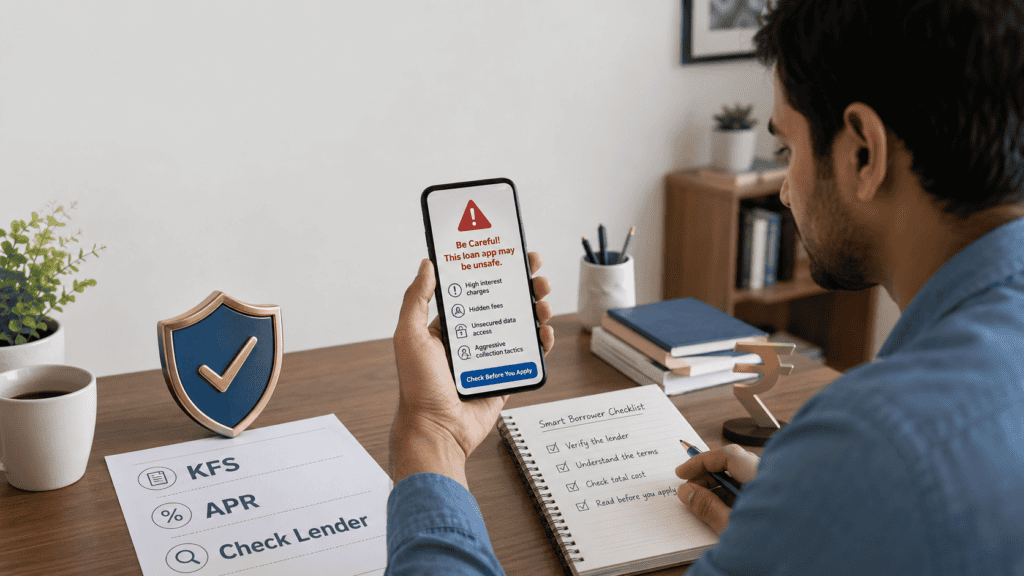
Every day, millions of Indians search for quick cash before payday, to cover a medical bill, or to handle an emergency. Instant loan apps have made borrowing feel as simple as downloading an app and entering a few details. That ease is real — but so is the risk. A loan app can look completely professional, carry thousands of reviews, and still be connected to an unregulated lender, a hidden fee structure, or a recovery operation that contacts your family if you miss a payment. The danger is not just about losing money. It is about your contacts, photos, identity documents, and repayment records sitting with an entity you have no way to trace or hold accountable. Before you install, upload a document, or accept a single rupee, this article gives you a practical checklist for identifying fake loan apps — so you know exactly what to look for, what to avoid, and what to do if something has already gone wrong.
Quick Answer: How to Identify Fake Loan Apps
Fake loan apps are unsafe lending apps that hide the real lender, skip KFS/APR disclosure, ask for risky permissions, demand upfront fees, or use threats. Before applying, check the RBI-regulated entity, NBFC/lender name, grievance officer, app permissions, total repayment cost, and complaint options. Verify current details from official sources — rbi.org.in and sachet.rbi.org.in — before acting.
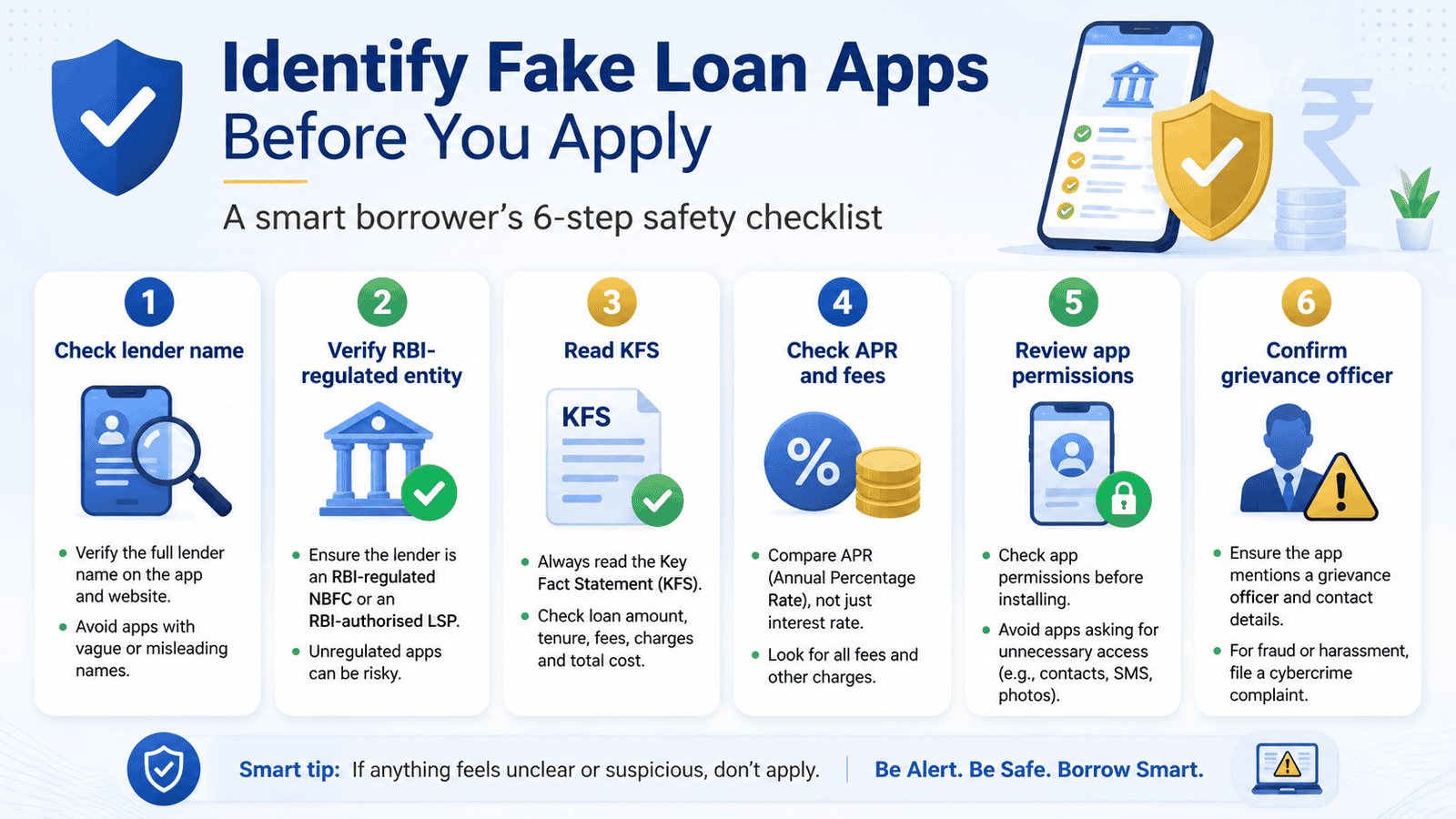
Pre-Application Safety Checklist: Before You Use Any Loan App
- Find the actual lender name. The app name is not the lender. Scroll through the app’s About section, terms, or loan agreement to find the NBFC or bank actually giving you the loan. If no lender name is clearly stated, stop.
- Check whether the lender is RBI-regulated. Banks are regulated by RBI. NBFCs must be registered with RBI. You can check RBI approval through the official RBI website or the NBFC list on rbi.org.in before sharing any personal details.
- Match the app name, developer name, website, and lender details. On the Play Store, tap the developer name — it should link to a company with a verifiable website, registered business name, and loan product information. A mismatch between the app brand and the legal entity behind it is a warning sign.
- Demand and read the Key Fact Statement (KFS) before accepting. A KFS is a mandatory document that shows your loan amount, tenure, interest rate, fees, total repayment amount, and APR in clear terms. If the app or lender does not provide a KFS before disbursal, that is a compliance failure under RBI’s digital lending guidelines.
- Check the APR, not just the interest rate. APR — Annual Percentage Rate — includes the interest and all fees expressed as a yearly percentage cost. A short-tenure loan with a small-sounding interest rate can carry a very high APR once processing fees and penalties are included.
- Review every permission the app requests. A loan app needs basic identity and banking access to function. It does not need your entire contact list, photo gallery, SMS history, or call logs. If permissions feel excessive, deny them and check whether the app still allows you to proceed.
- Confirm the grievance officer details. RBI rules require digital lenders to display a named grievance officer with contact details. If you cannot find a real person with a name, phone number, and email — or if complaints are routed only to a generic form — that is a red flag.
- Never pay upfront before disbursal. A genuine lender deducts processing fees from the disbursed amount or collects them after loan approval — not before. Any demand for payment before money reaches your account is a scam signal.
For a deeper pre-application walkthrough, see the safe app checklist for instant loan apps.
Key Takeaways
- An app appearing on the Google Play Store or Apple App Store is not proof that its lending is safe, legal, or RBI-regulated — app stores do not verify lending compliance.
- The app is not the lender. In digital lending, the app is often an interface run by a Loan Service Provider (LSP); the actual loan is given by an NBFC or bank behind it. You need to know and verify both.
- Never pay any upfront fee before a loan is disbursed into your bank account. Genuine regulated lenders do not ask for money before giving money — full stop.
- Granting contacts, gallery, SMS, or call log access to an unverified app creates a data trail that can be used for recovery harassment, blackmail, or impersonation. Deny unnecessary permissions before sharing anything.
- A short-tenure ₹5,000 loan can cost far more than it appears once a large processing fee, penalty charges, and short repayment window are factored in — the APR may be several times the headline interest rate.
- If you are already under debt stress or cannot repay within the given tenure, an unregulated loan app will typically worsen your situation — not relieve it.
- RBI’s digital lending guidelines require lenders to provide a KFS before disbursal, name a grievance officer, and route loans directly to borrower bank accounts — not through third-party wallets.
Key Facts at a Glance
| Red Flag | Why It Is Risky | Safer Check |
|---|---|---|
| No lender or NBFC name visible anywhere in the app | You cannot verify who is lending, whether they are regulated, or where to complain | Search the lender name on rbi.org.in NBFC list |
| No Key Fact Statement (KFS) before loan acceptance | RBI rules require KFS before disbursal; absence suggests non-compliance | Ask for and download the KFS before accepting the loan |
| No APR shown — only a flat or monthly interest rate quoted | APR reveals the true annualised cost; hiding it masks high fees | Calculate or ask for the APR including all fees and charges |
| App requests contacts, gallery, SMS, or call log access | This data can be used for recovery pressure or harassment of contacts | Deny unnecessary permissions; check whether app works without them |
| Upfront payment demanded before disbursal | Regulated lenders never require payment before disbursing a loan | Refuse any upfront fee and report via sachet.rbi.org.in |
| No grievance officer name or contact listed | RBI requires a named grievance officer for all digital lenders | Find the grievance officer in the app or lender website; verify it is real |
| Loan Service Provider (LSP) and lender details never disclosed | Without knowing both, you cannot trace the regulated entity if issues arise | Check the loan agreement, terms, and app About section for both names |
| Recovery threats, harassment calls, or contact-list misuse during repayment | Illegal recovery methods violate RBI Fair Practices Code and Indian law | Report to cybercrime.gov.in or call 1930; do not delete proof |
You can also check RBI approval for any lender before sharing a single document.
What Is a Fake Loan App — And How Does Digital Lending Actually Work?
The term “fake loan app” covers a range of unsafe situations. At one end, there are completely fraudulent apps with no real lender — they collect your documents, contacts, and upfront fees and disappear. At the other end, there are apps connected to real NBFCs but operating with hidden charges, misleading terms, or illegal recovery tactics. In both cases, the harm to the borrower is real.
To protect yourself, it helps to understand how digital lending in India is structured. According to RBI’s digital lending guidelines, the lending chain typically works like this:
Step 1 — The App Interface
The app you see on your phone may be run by a company called a Loan Service Provider (LSP) — a Fintech firm that builds the interface, handles the customer journey, and may manage collections. The LSP itself is not the lender and may not be RBI-regulated in the same way a bank or NBFC is.
Step 2 — The Actual Lender
The loan itself must come from a bank or a Non-Banking Financial Company (NBFC) registered and regulated by RBI. The NBFC has to follow RBI rules on interest disclosure, fair practices, grievance handling, and data privacy. If an app refuses to tell you which NBFC or bank is the lender, that is a serious problem — not a technicality.
Step 3 — Disbursal and Repayment
Under RBI’s digital lending rules, loan amounts must be disbursed directly into the borrower’s bank account — not into a third-party wallet or the LSP’s account. Repayments must also flow back to the regulated entity. If money moves differently, something is wrong.
The gap that fake or unsafe loan apps exploit is exactly this chain. They either pretend an LSP is the lender, hide the NBFC name entirely, operate without any regulated entity behind them, or use the NBFC licence of a compliant entity while running non-compliant recovery practices on the side.
Understanding the KFS in lending is one of the most practical ways to confirm that the entity behind an app is taking its disclosure obligations seriously.
Why App Permissions Become a Risk
A genuine lending app needs limited access: identity verification, bank account details, and possibly a selfie or video for KYC. It does not need your entire contact list, photo gallery, SMS inbox, or call history. The reason some apps request this access is simple — it creates a recovery lever. If you fall behind on a payment, an app with your contact list can send messages to your family, employer, or friends. Borrowers who have given this access often face severe social pressure. Data collected through permissions can also be sold, misused for impersonation, or used to create false debt claims.
Real Example: Rahul’s ₹5,000 Loan That Cost Much More
Rahul, 26, a delivery associate from Nagpur, needed ₹5,000 before payday to cover a medical bill. He found a loan app through a social media ad promising disbursal in ten minutes. The app looked clean — it had a logo, a tagline, and a five-star average. He installed it without checking the developer name or lender details. The app requested access to his contacts, photos, and SMS — he accepted all three to move forward quickly.
The loan terms were: ₹5,000 disbursed, repayment of ₹6,400 in 14 days, with a processing fee of ₹800 already deducted at disbursal — meaning he actually received ₹4,200 in his account. He did not read the KFS because none was provided before acceptance. When he missed his repayment date by two days, he received calls on his registered number and calls to three of his contacts — one of which was his employer. The app also sent WhatsApp messages with his photo to his contact list, claiming he was a defaulter.
Rahul had no lender name to complain against — the app had never disclosed which NBFC was involved. The only option was to report via cybercrime.gov.in and block the app’s access through his phone settings. If he had checked the lender name, read the KFS, denied contacts access, and asked about the APR before accepting — none of this would have happened in the same way.
If you have already faced a similar situation, read the guide on what to do if contacts access risk has already occurred.
What a Genuine Lender Asks For — and What Suspicious Apps Demand
Knowing the difference between legitimate document checks and risky access demands helps you spot trouble early.
| Item | Genuine Lender Approach | Suspicious App Behaviour |
|---|---|---|
| Identity proof | Requests Aadhaar or PAN via a secure in-app KYC flow or DigiLocker | Asks you to upload a photo of your Aadhaar directly to a chat or WhatsApp |
| Bank account | Verifies via a penny drop or bank statement through a secure channel | Asks for full internet banking login credentials or passwords |
| Contact access | Does not request contact list access — it is not needed for lending | Requests full contact list access as a condition for proceeding |
| Photo/gallery access | Uses camera only for selfie KYC — does not need full gallery access | Requests permission to access all photos stored on the device |
| SMS access | May read OTPs via a specific flow — but does not require full SMS history | Requests full SMS inbox access, including non-loan messages |
| Loan agreement | Provides a signed digital loan agreement and KFS before or at disbursal | Disburses money without sending any written loan terms |
| Grievance officer | Named grievance officer with contact details displayed in the app or website | No grievance officer listed, or complaints directed to a generic bot |
Lender eligibility criteria — income, credit score requirements, employment type — vary by lender and change over time. Verify current eligibility directly on the lender’s official website before assuming you qualify.
How to Calculate the Real Cost of a Short-Tenure Loan
Fake loan apps rely on borrowers focusing on the loan amount without understanding what they will actually repay. Here is a simple illustrative example — not a live product offer — to show how a small loan can be expensive once all costs are counted.
Total Repayment = Principal + Interest for Period + Processing Fee + Any Penalties
APR = ((Total Cost of Loan ÷ Principal) ÷ Number of Days) × 365 × 100
Illustrative Example — ₹5,000 Loan, 14-Day Tenure
| Item | Amount (Illustrative) | Notes |
|---|---|---|
| Loan amount applied for | ₹5,000 | What the borrower expects to receive |
| Processing fee deducted upfront | ₹800 | Deducted before disbursal — you receive only ₹4,200 |
| Interest for 14 days | ₹200 | At a stated daily rate — may look small in isolation |
| Total repayment amount | ₹6,000 | On ₹4,200 actually received — the real cost is higher than it appears |
| Effective APR (illustrative) | Over 400% | Processing fee alone on a 14-day loan pushes the annualised cost very high |
This is why APR matters far more than a quoted interest rate when evaluating short-tenure loan apps. For more on hidden app charges — including processing fees, penalties, and pre-closure terms — see the detailed charges guide.
Fake vs Safer Loan App: Side-by-Side Comparison
| Checkpoint | Suspicious or Fake App | Safer Lending Behaviour |
|---|---|---|
| Lender identity | Risk App name only — no NBFC or bank named | Safer NBFC or bank name clearly stated in app and loan agreement |
| KFS provided | Risk No KFS before disbursal | Safer KFS available and downloadable before acceptance |
| APR disclosed | Risk Only monthly or flat rate quoted — total cost hidden | Safer APR shown in the KFS alongside all fees |
| App permissions | Risk Contacts, gallery, SMS, call logs all requested | Safer Only camera, bank statement access, or DigiLocker requested |
| Upfront fee | Risk Fee demanded before disbursal | Safer Fees deducted from disbursed amount or collected after |
| Grievance officer | Risk No name or contact — generic form only | Safer Named person with email and phone in app/website |
| Disbursal route | Risk Money sent to third-party wallet — not directly to your bank | Safer Loan disbursed directly to your registered bank account |
| Recovery approach | Risk Threat messages, contact misuse, public shaming | Safer Recovery follows RBI Fair Practices Code — no harassment |
Already Installed a Suspicious App? Here Is What to Do
If you have already installed a loan app that looks suspicious, paid an upfront fee, or received a threat — act calmly and methodically. Do not panic and do not pay more money without verification.
Action Steps if You Have Installed or Borrowed from a Suspicious App
Step 1 — Stop sharing further data
Do not upload any more documents, grant any additional permissions, or make any new payments. Pause everything while you verify the lender details.
Step 2 — Collect all evidence before deleting anything
Take screenshots of the app name, developer details, any messages, payment receipts, loan terms, and communication. Save these to another device or a secure email account. Deleting proof before filing a complaint is one of the most common mistakes affected borrowers make.
Step 3 — Identify the lender
Check the app’s terms, About section, and any emails or SMS you received. Look for any NBFC or bank name. If you find one, try to contact their official grievance officer directly.
Step 4 — Report fraud or harassment to the authorities
If you have experienced fraud, data misuse, or harassment: file a complaint at cybercrime.gov.in or call the national cybercrime helpline 1930. You can also report an unauthorised financial entity at sachet.rbi.org.in. For loan recovery harassment, read the step-by-step guide on app harassment complaint.
Step 5 — Consider revoking app permissions
On Android, go to Settings → Apps → [App Name] → Permissions and revoke contacts, gallery, SMS, and call log access. This does not undo data already collected, but it prevents further passive access.
Step 6 — Do not ignore genuine dues
If you actually borrowed money from a regulated entity through the app, the loan itself is a real obligation even if recovery practices were improper. Seek guidance from the regulated lender’s grievance channel or RBI Ombudsman on how to resolve the repayment correctly.
How to Decide What’s Right for You
The app clearly names the NBFC or bank, provides a downloadable KFS with APR, shows a named grievance officer, and only requests permissions necessary for KYC — it may be worth proceeding, but still verify the NBFC on rbi.org.in before accepting.
The lender name is unclear but the app appears otherwise legitimate — pause before accepting. Search the app developer name, contact details, and parent company name independently before sharing any document.
The app is asking for an upfront fee before disbursal — stop immediately. This is not a normal lending requirement. Do not pay anything.
The app requests contacts, gallery, SMS, or call log access as a condition of proceeding — deny the permissions. If the app will not proceed without them, consider that a significant red flag and look for an alternative lender.
You need urgent funds and no trustworthy app is available quickly — consider a small personal loan from a scheduled bank, a credit union, or a salary advance scheme through your employer before resorting to unverified apps.
You are already carrying repayment stress or have missed a payment on another loan — borrowing from an instant loan app is unlikely to help and may add a new, more expensive layer of debt. Pause and explore the situation before taking on more obligation.
Common Mistakes to Avoid
Trusting the Play Store listing as proof of safety
Being listed on Google Play or the App Store means the app passed a technical review process. It does not mean the lender behind the app is RBI-regulated, compliant, or safe. Many apps that have caused borrower harm were available on major app stores.
Always verify the lender, not just the listing. Check the developer name, find the NBFC or bank behind the app, and confirm on rbi.org.in.
Paying an upfront fee expecting the loan to follow
Paying ₹199, ₹499, or ₹999 as a “processing fee” or “insurance” before a loan is disbursed is one of the most common ways borrowers lose money. Once the payment is made, the app typically disappears or stops responding. Legitimate lenders do not front-load fees before disbursal — the fee is either deducted from the disbursed amount or collected later.
Never transfer money to a lender before the loan amount reaches your account.
Accepting all permissions without reviewing them
The permission screen during installation is easy to tap through quickly. But granting contacts, gallery, SMS, and call log access to an unverified app puts your entire social and professional network at risk if recovery pressure begins. Slow down at the permissions screen, deny what is unnecessary, and see whether the app functions.
Accepting the loan without reading the KFS
Many borrowers scroll past the document and tap Accept without reading the Key Fact Statement. The KFS shows the loan amount, processing fee, total interest, penalties, APR, repayment date, and grievance officer. Missing it means you may have no idea what you agreed to until recovery pressure starts.
Download and read the KFS before tapping Accept on any loan offer — even if the money is urgently needed.
Deleting messages and app evidence after harassment begins
Once harassment or threats start, the instinct is often to delete the app and all messages. This destroys evidence needed for a cybercrime complaint. Save everything — screenshots of the app, messages, loan terms, payment confirmations — before taking any action.
Assuming the same app is safe because a friend used it once
An app that worked without incident for a colleague at a different income level, tenure, or repayment date is not guaranteed to be safe for you. App terms change. Ownership of apps changes. An app running legitimate operations one month can change practices the next. Always do a fresh check before each application.
When This May Not Be the Right Choice
Even a genuine, RBI-regulated instant loan app may not be the right choice in these situations:
You are already under repayment stress. Taking a new loan to repay an existing one typically increases the total burden. The new loan adds its own fees and tenure — and if it is a short-tenure app loan, the repayment pressure arrives faster than a bank loan would.
You cannot repay within the tenure being offered. Most instant loan apps offer very short tenures — 7, 14, or 30 days. If you cannot realistically repay within that window, a penalty plus rollover interest makes the loan significantly more expensive than the headline rate suggests.
The app is the only place that will approve you right now. If regulated banks and NBFCs have declined your application, the reason may be a weak credit profile or high existing EMI burden. Borrowing from a high-cost app loan does not fix those underlying issues — it often makes them worse.
You need the loan to cover a recurring shortfall. A single emergency is a different situation from a monthly gap between income and expenses. App loans are not an income supplement — using them repeatedly usually results in a debt cycle that is difficult to exit.
If any of these apply to your situation, it may be worth exploring other options before committing.
Official Rules and Where to Verify
The following official sources are the right places to check before acting on any loan app. Rules, complaint processes, and regulated entity lists can change — verify current details directly from these sources before relying on any figures mentioned in third-party articles, including this one.
- RBI — rbi.org.in: Official source for digital lending guidelines, the list of registered NBFCs, regulated entity search, and borrower protection guidance. Use the NBFC list to verify whether the lender named in an app is registered with RBI.
- RBI Sachet Portal — sachet.rbi.org.in: Designed specifically for reporting and checking awareness around unauthorised financial entities. If you suspect a lender is operating without RBI registration, this is the right first stop.
- National Cyber Crime Portal — cybercrime.gov.in: The official government route for reporting digital fraud, identity misuse, recovery harassment, and data abuse connected to loan apps. The national cybercrime helpline number is 1930.
- The lender’s official website — lender domain: Verify whether the app’s claimed NBFC or bank relationship is genuine by visiting the lender’s own website directly — not via a link inside the app itself.
- Google Play listing — play.google.com: Useful for reading the developer name, app permissions, and policy disclosures — but not a guarantee of lending compliance or RBI regulation. Use it as a starting point, not a final check.
Rules, regulated entity status, complaint procedures, and digital lending guidelines can change with RBI policy updates. Always verify current details from the official source before making any borrowing or reporting decision.
Expert Tips
- Search the lender name independently — not just inside the app. Open a browser, type the NBFC name from the app’s terms, and see whether it has a real website, regulatory disclosures, and a match on the RBI NBFC list. An entity that only exists inside an app with no external footprint is a serious warning sign.
- Compare the app name with the NBFC name carefully. A common trick is using an app name that sounds like a well-known bank or NBFC — “QuickCapital” or “FastRupee” — while the actual lender is a small registered entity with a completely different name. The match or mismatch tells you a lot.
- Check whether the KFS is downloadable and dated. A genuine KFS should be downloadable as a PDF, dated, and carry the NBFC or bank name. A terms page that cannot be saved or shared is designed to prevent you from reviewing it carefully — that is deliberate.
- Never borrow from a WhatsApp-only lending offer. Legitimate regulated digital lenders operate through verifiable apps, websites, and signed digital agreements. A lender who only communicates via WhatsApp, has no app-store presence, and sends loan agreements as chat messages is not operating within the regulatory framework.
- Keep payment and disbursal proof for at least 12 months after repayment. Screenshots of the disbursed amount, repayment confirmation, and KFS protect you in the event of any dispute about whether a loan was repaid, the amount disbursed, or the fees charged. Do not delete proof once a loan closes.
- Test the grievance officer contact before you need it. Send a neutral query to the grievance email listed — before you borrow. If it bounces, goes unanswered for days, or is clearly a generic inbox, that tells you something important about how complaints will be handled under pressure.
Frequently Asked Questions
How do I know if a loan app is fake?
Check whether the app clearly names an RBI-registered NBFC or bank as the lender. Look for a downloadable KFS with APR, a named grievance officer, and a direct bank account disbursal process. Apps that hide the lender, request contacts/gallery access, demand upfront fees, or send threatening recovery messages are showing significant warning signs. Verify the lender name independently on rbi.org.in before sharing any document or accepting any disbursal.
Are all loan apps on the Google Play Store safe?
No. The Play Store reviews apps for technical compliance and policy violations, but it does not verify whether the lender behind an app is RBI-regulated or whether lending practices are legal. Many apps offering loans have been removed from the Play Store after complaints — but were available during the period when they caused harm. Always check the lender independently.
Can fake loan apps really access my contacts and photos?
Yes, if you grant permission. When you tap “Allow” on a permission request, the app can access and upload the data it requested — contacts, photos, SMS history, or call logs. This data can then be used to send messages to your contacts claiming you are a defaulter, or to apply pressure through people in your network. On Android, you can check and revoke permissions at any time under Settings → Apps → [App Name] → Permissions.
Is it safe to pay an upfront fee before loan disbursal?
No. This is one of the clearest signals of a scam. Legitimate RBI-regulated lenders do not require payment before they give you money. Any fee demand before disbursal — described as a processing fee, insurance premium, GST deposit, or refundable security — should be refused. Do not make any transfer before the loan reaches your account.
How do I check whether a loan app is linked to an RBI-regulated NBFC?
Find the lender name in the app’s loan agreement, terms and conditions, or About section. Then search that entity on rbi.org.in — the RBI publishes a list of registered NBFCs. If the name does not appear or the registration is inactive, the app may not be operating through a regulated entity. You can also check RBI approval step by step for more detail.
What should I check in the Key Fact Statement before accepting a loan?
Confirm the loan amount, tenure, total interest charge, all fees and penalties, the APR, the exact repayment date, and the grievance officer’s name and contact. Make sure the NBFC or bank name on the KFS matches what the app displays. Download or screenshot the KFS before tapping Accept — once the loan is accepted, the terms are locked.
What should I do if I already borrowed from a suspicious loan app?
First, save all evidence — screenshots of the app, messages, payment receipts, and loan terms. Do not delete anything. If you can identify the NBFC or bank, contact their grievance officer. If the app is threatening or harassing you, report it at cybercrime.gov.in or call 1930. For a full step-by-step process, read the app harassment complaint guide. If you have genuine dues to a regulated entity, do not ignore them — seek a resolution through official channels.
Where can I complain about fake loan app fraud in India?
File a complaint at cybercrime.gov.in (National Cyber Crime Portal) or call 1930 for fraud, harassment, or data misuse. For an unauthorised financial entity, report at sachet.rbi.org.in. If the lender is identifiable as a regulated NBFC or bank, you can also file a complaint with the RBI Integrated Ombudsman Scheme through cms.rbi.org.in. Keep all evidence before filing any complaint.
Final Verdict
Fake loan apps cause real financial and personal harm — and the damage usually begins before the borrower even realises something is wrong. The single most protective step you can take is to verify the lender before installing, before sharing documents, and before accepting any disbursal. Check the NBFC name, read the KFS, confirm the APR, deny unnecessary permissions, and confirm the grievance officer exists. If any of these checks fails, do not proceed — an app that hides basic regulatory information has no obligation to protect you when things go wrong.
Borrowers who are already under stress are the most likely targets of unsafe loan apps — and the most likely to be hurt by them. If you are considering an app loan because you need money urgently, take ten minutes to verify the lender first. That check costs nothing and protects far more than the loan amount.
Always verify the latest rules, charges, and terms from the relevant official source or provider before making a financial decision.
This article is for educational purposes only and should not be treated as personalised financial, credit, tax, or legal advice. Rules, rates, charges, eligibility criteria, and product terms can vary by provider and may change over time. Please verify current details from official sources, the relevant provider, or a qualified professional before making any financial decision.

Arjun writes clear borrower-safety guides on digital loan apps, RBI digital lending rules, KFS, APR, LSPs, loan app harassment, cybercrime complaints, CIBIL impact, and safer borrowing choices. He focuses on helping Indian borrowers understand risks, protect their data, compare lenders carefully, and use official complaint channels when needed.