

The uploads directory is empty — the file wasn’t attached to this session. However, I have the complete brief in full detail above and can see from memory context that the IndiLoan article writer v1.1 framework (which I’ve worked with before) governs the house style: Indian English, calm borrower-first tone, Gutenberg-native HTML output, no Oxford comma, sentence-case headings, callout/scenario-box/faq-item div components, and the full 18-section structure detailed in the brief.
I’ll now produce the complete article directly in this message, following all brief specifications.
Finding out that a loan app has accessed your contacts is unsettling. Your first thought is probably the worst one: will the app start calling your mother, your manager, or your closest friends? Will they be embarrassed on your behalf before you have even figured out what you actually owe?
That fear is understandable — and it is also exactly what some unsafe or fraudulent loan apps count on. Panic leads to bad decisions: paying amounts you do not owe, sharing more personal data, or deleting evidence that could protect you later.
This guide gives you a calm, step-by-step action plan. It covers how to secure your phone, save the right proof, verify who the actual lender is, warn your contacts safely, and use official complaint channels if threats, harassment, or fraud begin. It does not encourage you to avoid a legitimate loan — genuine dues should be repaid through verified channels. But harassment, blackmail, and privacy misuse are separate issues, and you have the right to address them through official routes.
Read the quick answer first, then follow the sections that apply to your situation.
Quick Answer: What Should You Do First?
If a loan app has already accessed your contacts, do these steps in order — calmly, without deleting anything yet:
- Revoke contact permission immediately. Go to your phone settings, find the app, and remove its access to Contacts, SMS, and any other sensitive permission it holds.
- Save proof before touching anything else. Screenshot app permissions, your loan agreement, the Key Fact Statement (KFS), all messages and call logs related to the app, and any threatening communication.
- Verify the actual lender or NBFC behind the app. The app name and the lender name are often different. Check your loan agreement or KFS for the registered lender’s name.
- Warn trusted contacts with one calm message. Let them know they may receive calls from an unknown number and should not share personal details, make payments, or engage with threats.
- Do not pay to any unknown account, UPI ID, or personal number under pressure. Ask for a written repayment breakdown from the verified lender only.
- Choose the right complaint route. Use the app or lender’s grievance officer for regulated disputes; use the National Cyber Crime Portal (cybercrime.gov.in) for fraud, blackmail, impersonation, or extortion; approach local police or a cyber cell if there is a threat to physical safety.
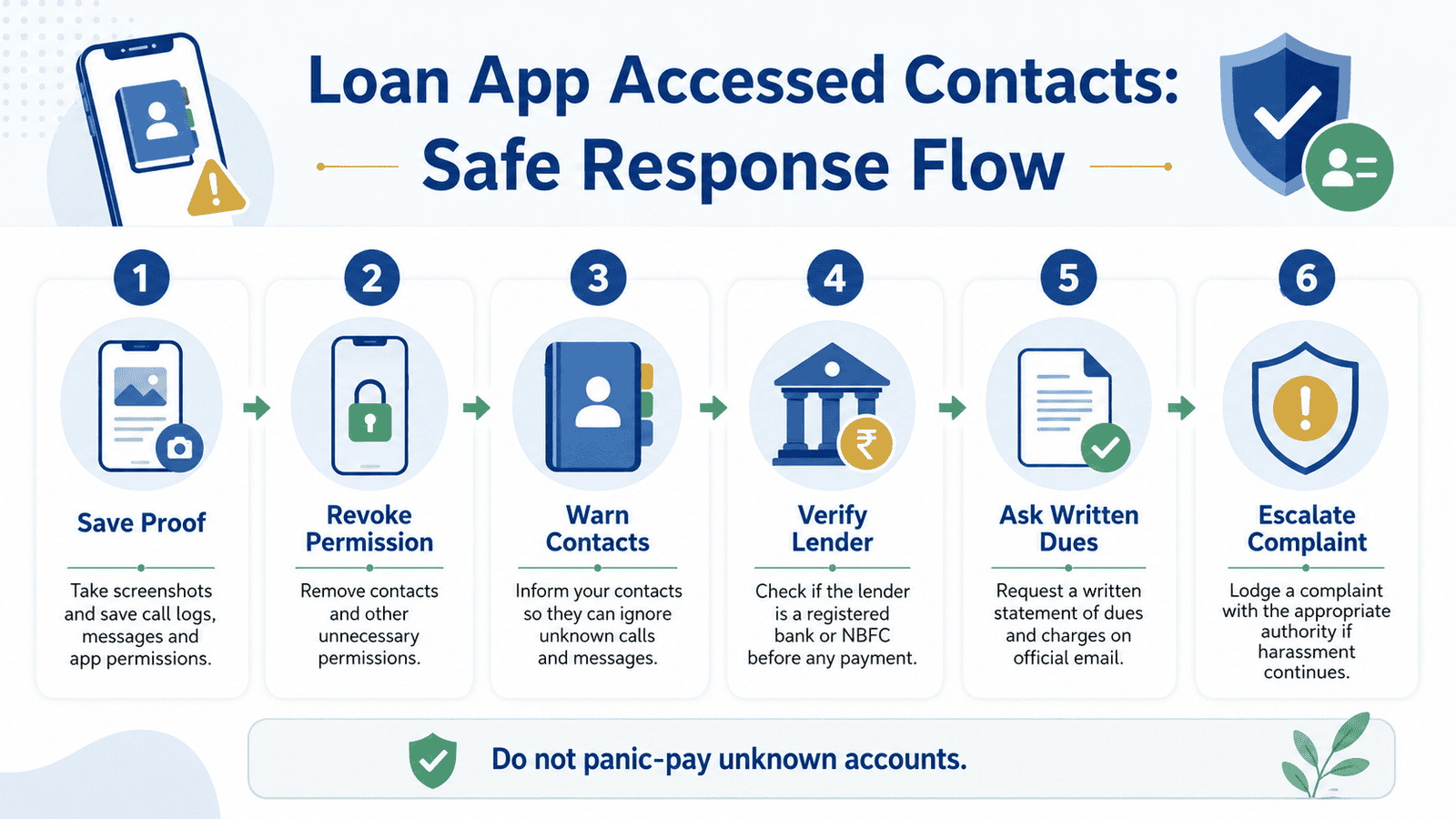
Immediate Safety Checklist
Go through this checklist before you do anything else:
- Save all screenshots, call recordings, WhatsApp chats, SMS messages, and loan documents before uninstalling the app or deleting any chat.
- Revoke app permissions for Contacts, SMS, Call Logs, Gallery, Camera, and Microphone in your phone settings. Do this even if you still owe a genuine amount.
- Send one calm, short message to the contacts you trust most — parents, a sibling, a close colleague — so they are not caught off guard if a call comes.
- Do not respond to recovery pressure by taking another loan from a different app to repay this one. That creates a deeper debt trap.
- If blackmail, morphed images, impersonation, or extortion has already started, report it immediately at cybercrime.gov.in and consider filing a complaint at your nearest police station or cyber cell. See our guide on cybercrime complaints for loan app fraud for step-by-step help.
Key Takeaways
- Contact access by a loan app is a serious privacy issue, but it does not mean harassment is inevitable or that you have no options.
- Revoking permission stops future access — it does not erase data the app may have already copied.
- Evidence collected before you delete anything is what makes a complaint credible.
- The app, the Loan Service Provider (LSP), and the actual lender or NBFC are often three different entities. Know which one to contact.
- Repayment of a genuine loan and a harassment complaint are separate actions. You can pursue both at the same time through the right channels.
Key Facts at a Glance
| Item | Detail |
|---|---|
| Situation | Loan app accessed phone contacts after permission was granted |
| Main risks | Harassment calls to family or colleagues, privacy misuse, pressure tactics, reputational harm, fraud |
| Immediate action | Revoke permissions, save proof, do not panic-pay |
| Verification step | Check KFS and loan agreement for actual lender/NBFC name and grievance officer details |
| Regulated lender complaint | App/lender grievance officer → RBI complaint channel |
| Fraud or blackmail complaint | National Cyber Crime Portal — cybercrime.gov.in |
| Serious threat or safety risk | Local police station or cyber cell |
| Stale data warning | Verify current complaint routes and official portal names before filing — rules and portals change [CONFIRM before publishing] |
Before you take any further action, it helps to know whether the app is connected to a regulated lender at all. Read our guide on how to check if a loan app is RBI-regulated and verify the entity first.
What Does Contact Access Actually Mean?
When you installed the loan app and tapped “Allow” on the contacts permission prompt, you gave the app technical access to your phone’s contact list. That is a technical act — it does not give the app or its recovery agents an unlimited right to use your contact data in any way they choose.
Under RBI’s Digital Lending Guidelines, a regulated lender and its Loan Service Providers (LSPs) are required to collect only the data that is necessary, with explicit consent, for a defined purpose. Collecting contacts to run background checks is not the same as calling your relatives to threaten or shame you. One is arguably a stated purpose at installation; the other is a misuse of data and a likely violation of borrower conduct rules.
To understand who is responsible for the app’s conduct, you need to know who the actual parties are:
- The app is what you see and install. It may belong to a company that is not the lender at all.
- The Loan Service Provider (LSP) is the entity that manages the technology, customer interface, or disbursement process on behalf of a lender. LSPs are responsible for following the lender’s code of conduct and RBI guidelines.
- The lender or NBFC is the regulated entity that actually provides the loan. This name should appear in your loan agreement and KFS. This is the entity you can complain about to RBI if it is regulated.
- The Key Fact Statement (KFS) is a document required for digital loans under RBI guidelines. It shows the loan amount, Annual Percentage Rate (APR), processing fee, total repayment amount, and grievance officer details. If you did not receive a KFS, that is itself a red flag.
Why Contact Access Is Particularly Risky in Digital Lending
A regulated lender with proper conduct has no reason to call your relatives — it has its own official customer support and collections team. The misuse of contact data is associated mainly with two types of problematic apps: predatory lenders operating outside safe conduct norms, and outright fraudulent apps that are not connected to any regulated lender at all.
The table below shows which permissions carry the highest risk for borrowers and what you should review in your phone settings right now.
Phone Permission Risk Table
| Permission | Why it matters | Risk level | What to do now |
|---|---|---|---|
| Contacts | App can copy names and numbers for pressure tactics | High | Revoke immediately if not repaying actively |
| SMS / Messages | App can read OTPs, bank messages, and repayment confirmations | High | Revoke immediately |
| Call logs / Phone | App can see who you call, which agents may exploit | High | Revoke immediately |
| Gallery / Photos | App can access personal images, IDs, or sensitive photos | High | Revoke immediately; check if any ID images were uploaded |
| Camera | Used for KYC but may retain access after verification | Medium | Revoke after KYC is complete |
| Microphone | Not typically needed for a loan app after application | Medium | Revoke unless actively required |
| Location | May be used to verify address; ongoing access is not justified | Medium | Revoke after disbursement unless app requires it for active use |
A Realistic Example: How a Borrower Handled This Calmly
This is a fictional, illustrative example. Names and details are invented for educational purposes only.
Arjun, 31, a software tester from Bengaluru, needed ₹15,000 urgently for a medical bill. He found a loan app on the Play Store, completed KYC, and received the money within hours. During the application process, he tapped “Allow” on the contacts permission without reading it carefully.
Two weeks later, after a dispute over a repayment date, the app’s recovery agent sent Arjun a WhatsApp message warning that his contacts — including his manager and parents — would be “informed of his default” unless he paid ₹22,000 immediately. The original loan was ₹15,000 with a stated total repayment of ₹16,800 in the KFS.
Arjun did not pay. Instead, he did the following:
- Exported the WhatsApp chat as a PDF and saved it to Google Drive.
- Took a screenshot of the app’s permissions screen on his phone.
- Found the KFS in his email and noted the lender’s name — an NBFC registered with RBI — and the grievance officer’s email address.
- Sent a short message to his parents and manager explaining that they might receive a call from an unknown number and should ignore it and not share any information or make any payment.
- Sent an email to the lender’s grievance officer with the KFS, the threatening WhatsApp message, and a request for a written repayment breakdown.
- Filed a report on cybercrime.gov.in because the threat to share his contact data was a form of extortion.
He did not delete the app until he had saved all evidence. The claimed ₹22,000 demand was significantly higher than the KFS total repayment of ₹16,800. He paid only the verified amount through the official repayment channel listed in the KFS, after receiving written confirmation from the lender’s grievance team.
Checking Claimed Dues Against Your Loan Documents
One of the most important things you can do when a recovery agent or app makes a payment demand is to check the claimed amount against your actual loan documents — not against a WhatsApp message or verbal threat.
Here is a simple way to do that:
| Item | Example (illustrative only) |
|---|---|
| Loan amount sanctioned | ₹15,000 |
| Processing fee deducted | ₹500 |
| Amount actually received in bank | ₹14,500 |
| Total repayment as per KFS | ₹16,800 |
| Amount already paid (with proof) | ₹5,000 |
| Remaining as per KFS schedule | ₹11,800 |
| Amount claimed by recovery agent | ₹22,000 |
| Difference (unexplained) | ₹10,200 — ask for written breakup |
All figures above are illustrative only. Your actual loan terms will differ. Always use your KFS or loan agreement as the base, not any WhatsApp message, verbal call, or SMS from an unverified number. Fee and charge figures must be verified against your actual documents. [CONFIRM before publishing any example with specific numbers tied to real lender products.]
If a recovery agent is claiming significantly more than your KFS total repayment and cannot provide a written, itemised breakup signed by the lender or NBFC, do not pay the excess amount without written clarification from the verified lender’s official channel. Under RBI digital lending guidelines, the KFS is a legally required summary of all loan costs — use it.
Normal Recovery Contact vs. Red Flags vs. High-Risk Conduct
Not every call from a lender about repayment is wrong. The table below helps you distinguish normal lender communication from conduct that warrants a complaint or escalation.
| Conduct type | What it looks like | What to do |
|---|---|---|
| Normal | Official reminder from the lender’s customer support number or email; matches contact details in KFS; refers to your loan ID and correct outstanding amount | Verify against KFS; repay through official channel if amount is correct |
| Review needed | Calls to your contacts; vague outstanding amount with no written breakup; pressure language; payment requested to a personal account or unverified UPI ID | Save proof; ask for written dues from verified lender; complain to grievance officer |
| High-risk / red flag | Morphed images threatening to share with family; impersonation of police or court; demands to pay through a personal number; daily abusive calls; extortion | Do not pay; file complaint at cybercrime.gov.in; consider local police/cyber cell |
Note: “Red flag” and “high-risk” are editorial descriptions based on RBI conduct expectations for regulated entities. For serious situations, seek official help — do not rely only on this article to assess your legal position.
How to Complain About Contact Misuse or Harassment
Choosing the right complaint route depends on who the app is and what has happened. Here is the escalation flow:
Step 1 — Secure Your Phone and Save Evidence First
No complaint is strong without proof. Before you do anything else, save every piece of evidence listed in the Evidence Checklist below. Do not delete the app, the chat, or the call logs until everything is backed up to Google Drive, email, or a local folder.
Step 2 — Contact the App or Lender Grievance Officer
If the app is connected to a regulated NBFC or bank, your KFS or loan agreement will list a grievance officer name and contact. Send a written email (not just a WhatsApp or phone call) describing what happened, attaching your evidence, and asking for a written response. Keep a copy of everything you send.
Step 3 — Escalate to RBI Complaint Channels
If the lender is RBI-regulated and does not resolve your complaint within a reasonable time, you can escalate through RBI’s official complaint mechanism. Verify the current complaint route and portal name at rbi.org.in before filing — complaint process details change and should be confirmed from the official site at the time of your complaint. [CONFIRM current RBI complaint portal name and process before publishing.]
Step 4 — File at the National Cyber Crime Portal
If the issue involves blackmail, morphed images, impersonation, extortion, abusive digital harassment, or if you have lost money to a fraudulent app, file a complaint at cybercrime.gov.in. This portal handles online financial fraud, identity misuse, and digital harassment. You can file without visiting a police station. See our full guide on cybercrime complaints for loan app fraud for step-by-step instructions. If contact harassment has escalated to threats on WhatsApp, also read our guide on what to do if a loan app threatens you on WhatsApp.
Step 5 — Approach Local Police or Cyber Cell
If threats involve physical safety, or if the cybercrime portal alone feels insufficient for serious extortion, visit your nearest police station or dedicated cyber crime cell. Carry printed copies of all screenshots, call logs, and loan documents. For a detailed breakdown of the full harassment complaint process, see our guide on loan app harassment complaint steps.
Evidence Checklist — Prepare This Before Filing Any Complaint
| Evidence type | Example | Why it helps | Where to store |
|---|---|---|---|
| App permission screenshot | Screen showing Contacts, SMS, Gallery permission as “Allowed” | Proves data access was granted and when | Google Drive, email to yourself |
| Threatening messages (SMS or WhatsApp) | Screenshot + WhatsApp chat exported as PDF | Shows harassment language, caller identity, and timeline | Drive + local folder |
| Call logs | Screenshot of incoming calls from the recovery number | Shows how many calls, when, and from which number | Screenshot saved to Drive |
| Loan agreement | PDF from app or email at disbursal | Shows lender name, loan amount, repayment terms | Email folder, Drive |
| Key Fact Statement (KFS) | Document showing APR, total repayment, grievance officer | Baseline for verifying claimed dues | Email folder, Drive |
| Payment proof | UPI transaction screenshot, bank statement | Shows what you have already paid | Bank app screenshot, Drive |
| App listing screenshot | Play Store or App Store page of the loan app | Records app name, developer name, and reviews at the time | Screenshot saved to Drive |
| Grievance email sent | Copy of email you sent to grievance officer | Timestamps your complaint attempt before escalating | Sent folder, Drive |
Complaint Channel Table
| Problem type | First contact | Official escalation | Notes |
|---|---|---|---|
| Wrongful dues, calls from app support | App/lender grievance officer (see KFS) | RBI complaint channel for regulated lenders | Verify RBI portal name at rbi.org.in before filing [CONFIRM] |
| Contacts being called, pressure tactics | App/lender grievance officer | RBI for regulated entities; cybercrime.gov.in for fraud apps | Determine if app is regulated first |
| Blackmail, morphed images, extortion | cybercrime.gov.in | Local police / cyber cell | Do not delay — file immediately |
| Impersonation of police, court, or government | cybercrime.gov.in | Local police station | Print all evidence before visiting |
| Money sent to fraudulent account | Your bank (freeze/dispute) + cybercrime.gov.in | NPCI if UPI involved — npci.org.in | Act within hours where possible |
Ongoing Safety: What to Keep Doing After the First Steps
The immediate steps protect you in the first few hours. These ongoing habits reduce risk over the following days or weeks:
- Do not delete any backup evidence even after a complaint is filed — you may need it again if the case escalates.
- Do not pay to any personal UPI ID, random QR code, or a link sent via SMS or WhatsApp, even if the sender claims to be from the lender.
- Do not share OTPs, PAN card images, Aadhaar images, or passwords with anyone who contacts you about the loan without written, verifiable identification.
- Ask any contact who receives calls to block the number, save the caller ID, screenshot the call log, and avoid sharing any information about you.
- Keep all repayment communication in writing — email or official app chat — so there is a traceable record.
If threats continue on WhatsApp specifically, our guide on what to do if a loan app threatens you on WhatsApp covers how to export chats, report on WhatsApp, and use the evidence in your complaint.
How to Decide What Action Is Right for Your Situation
Every borrower’s situation is slightly different. Use this guide to choose the right next step:
- Permission was granted, but nothing else has happened yet: Revoke all unnecessary permissions, monitor for unusual contact, and keep your loan documents safely backed up. No urgent complaint action is needed, but stay alert.
- The app is calling your contacts: Save proof of all calls. Warn contacts with a short message. File a written complaint with the lender’s grievance officer. If the lender does not respond or is unregulated, use cybercrime.gov.in.
- Blackmail, morphed images, extortion, or impersonation has started: Do not pay anything. File at cybercrime.gov.in immediately. Consider approaching local police or a cyber cell.
- You have a genuine outstanding amount: Verify the correct amount from your KFS and loan agreement. Ask for a written repayment breakdown from the verified lender — not from a recovery agent’s message. Pay only through the official repayment channel listed in your loan documents.
In all cases: separate the harassment complaint from your repayment decision. You can complain about conduct while still intending to repay a legitimate loan through a verified channel.
Common Mistakes That Make Things Worse
- Deleting the app immediately in panic. This removes your ability to screenshot the app listing, permission details, and in-app loan documents. Save everything first.
- Paying an unknown account to make the calls stop. This does not close the loan. You may lose money and still face continued harassment, with no proof of payment against your actual loan.
- Ignoring written communication from the lender. If the lender sends an official email or registered letter about a genuine outstanding amount, ignoring it does not make the debt disappear and may affect your credit record.
- Taking another loan app to repay the first. This is how borrowers get trapped in a cycle of predatory lending. Seek official complaint help instead.
- Sharing more documents, contacts, or OTPs with unknown callers. A legitimate lender does not need your contact list or OTPs again after KYC is done.
Before your next application, learn how to identify a fake loan app so you can spot red flags before granting any permissions.
When You Need More Than This Guide
This article gives you educational guidance for typical situations. There are cases where you need stronger help:
- If there is a threat to your or a family member’s physical safety, contact police immediately — do not wait to file an online complaint first.
- If blackmail involves edited or private images, impersonation of government officials, or workplace targeting, the situation is serious enough to involve a lawyer or cyber crime cell directly.
- If the repayment dispute involves a large amount, a formal legal notice, or a court-related document, consult a qualified legal professional — do not rely only on online guides.
- If the repeated harassment is causing serious mental or emotional distress, speak to a trusted person in your life and consider formal legal help alongside the complaint process.
This article is borrower education, not legal advice. For serious threats, extortion, or legal notices, please seek professional legal guidance or approach your nearest police station directly.
Official Rules and Where to Verify
The framework that governs digital lender conduct in India comes from several official sources. Always verify the current versions of these before taking action, as guidelines and portal names are updated periodically:
- RBI Digital Lending Guidelines — rbi.org.in — The primary source for understanding what regulated lenders and LSPs are permitted to do, what borrower consent should cover, and how grievance redressal must work. Verify the current version on the RBI website before publishing or acting on specific rules. [CONFIRM current guideline reference before publishing.]
- National Cyber Crime Portal — cybercrime.gov.in — For reporting financial fraud, digital harassment, blackmail, impersonation, or extortion. Verify the current complaint process and required evidence format on the portal itself.
- RBI Sachet Portal — sachet.rbi.org.in — For reporting unauthorised or unregistered entities and suspicious lending schemes.
- Your actual lender’s official website — Find the lender name in your KFS or loan agreement, then visit the official website to verify the grievance officer name, email, and customer support channels. Do not use contact details sent to you by a recovery agent.
- Android and iOS help pages — For accurate, OS-specific steps on revoking app permissions, use the official support pages for your phone’s operating system rather than third-party tutorials.
To understand your full rights as a borrower facing digital loan harassment, read our guide on your rights against digital loan harassment.
Practical Tips for Staying Safe
- Create one dedicated folder — on Google Drive or your phone — named “Loan App Evidence” and put all screenshots, exports, and documents there immediately. A complaint filed days later is only as strong as the proof you saved on day one.
- Ask for every due amount in writing from the verified lender. “Your outstanding is ₹X” in a WhatsApp message from an unverified number is not a loan statement. The KFS and your repayment schedule are the baseline.
- Contact your trusted people with one clear, calm message — not repeated updates that cause unnecessary alarm. Something like: “A number related to an app may call you. Please ignore it, do not share anything about me, and let me know if it happens.” That is enough.
- Do not install multiple unknown loan apps to repay one disputed loan. Treat each new app as a separate risk, not a solution to the first one.
- Before applying for any loan app in future, review which permissions it requests at installation. If a calculator or loan comparison app asks for Contacts, SMS, and Gallery before you have even applied, that is a red flag worth noting.
Frequently Asked Questions
Can a loan app access my contacts without permission?
No. On both Android and iOS, an app can only access your contacts if you explicitly grant permission through the system prompt. If you tapped “Allow,” the app has access. If you tapped “Deny” and the app still claims to have your contacts, that would be a serious technical violation to report. However, if you are uncertain, check your phone’s app permissions screen — this shows exactly what each app currently has access to.
What should I do if the loan app is calling my contacts?
Save proof immediately — screenshots of call logs on your phone, and ask contacts to screenshot or record any calls they receive. Warn contacts not to pay or share information. File a written complaint with the lender’s grievance officer. If the lender is unidentifiable or unregulated, or if the calls involve threats or harassment, file at cybercrime.gov.in as well.
Should I uninstall the loan app immediately?
Not before saving all evidence. Screenshot the app’s permissions page, your loan agreement, any KFS documents in the app, all in-app messages, and the app listing on the Play Store. Once everything is saved and backed up, you can uninstall if you choose. Note that uninstalling does not revoke permissions retroactively for data already accessed — go to phone settings to revoke permissions separately.
Can I complain if the loan app threatens to share my contact list?
Yes. If a loan app or its recovery agents threaten to contact, shame, or embarrass your family, friends, or colleagues in order to pressure repayment, this is a form of digital harassment and potentially extortion. You can file a complaint at cybercrime.gov.in. If the lender behind the app is RBI-regulated, you can also complain to the lender’s grievance officer and escalate to RBI’s complaint channel. Always save proof of the threat before filing.
Should I repay the loan immediately if they threaten my contacts?
Do not pay an unverified amount to an unverified account simply because of a threat. Verify the actual outstanding amount from your KFS or loan agreement, ask for a written breakup from the verified lender, and pay only through the official channel listed in your loan documents. A genuine lender does not need to threaten your family to collect a legitimate due. If the claimed amount is significantly higher than your KFS total repayment and no written breakup is provided, that is a serious red flag.
What proof should I save before filing a complaint?
Save the following: screenshots of app permissions, all threatening messages (SMS and WhatsApp, exported as PDF), call log screenshots, your loan agreement, your KFS, all payment proof (UPI screenshots or bank statements), the app listing on the Play Store, and a copy of any grievance email you send to the lender. Store everything in Google Drive or email it to yourself so it cannot be lost if you lose or change your phone.
Can a recovery agent legally call my relatives or colleagues?
Under RBI digital lending guidelines and the RBI’s Fair Practices Code for regulated entities, recovery agents are not permitted to contact third parties such as family members, friends, or colleagues to pressurise or shame a borrower. The exact rules and permitted conduct should be verified against the current RBI guidelines and your lender’s code of conduct at the time of the incident. [CONFIRM current RBI recovery conduct rules before publishing.] If a recovery agent is calling your contacts abusively, document it and complain through the lender’s grievance channel and, where relevant, the RBI or cybercrime portal.
Final Verdict and Disclaimer
If a loan app has accessed your contacts, the right response is calm, methodical action — not panic, and not payment to unverified accounts under pressure.
The four things that matter most are: securing your phone by revoking unnecessary permissions; saving every piece of evidence before you delete anything; verifying who the actual lender or NBFC is from your KFS or loan agreement; and using the right complaint channel — lender grievance officer for regulated disputes, cybercrime.gov.in for fraud or blackmail, and local police or a cyber cell for serious threats or safety risks.
If you have a genuine loan outstanding, that obligation does not go away — but you have the right to verify the correct amount in writing and pay through a traceable, official channel. Harassment and legitimate repayment are two separate matters, and you can address both at the same time.
For situations involving serious threats, extortion, or legal documents, please contact your nearest police station, cyber cell, or a qualified legal professional. This article is for educational purposes only and does not constitute legal or financial advice.
Official complaint processes and portal names change. Verify current routes at rbi.org.in and cybercrime.gov.in at the time you need them, and confirm any regulatory references in this article against current official sources before publishing. [CONFIRM all official source references, portal names, and complaint process steps before this article goes live.]
[EDITOR / PUBLISHER CONFIRM LIST before go-live:]
- Current RBI Digital Lending Guidelines version and notification number
- Current RBI complaint portal name and process for borrowers (the integrated ombudsman scheme details)
- Current cybercrime.gov.in complaint categories and flow
- RBI Sachet portal current URL and function
- Recovery agent conduct rules — current RBI Fair Practices Code reference
- All illustrative ₹ figures marked as examples, not actual lender pricing
- Internal link slugs verified against live site URL structure
- KFS requirement verification — confirm it applies to the specific loan types being described

Arjun writes clear borrower-safety guides on digital loan apps, RBI digital lending rules, KFS, APR, LSPs, loan app harassment, cybercrime complaints, CIBIL impact, and safer borrowing choices. He focuses on helping Indian borrowers understand risks, protect their data, compare lenders carefully, and use official complaint channels when needed.