
Every day, thousands of Indians search “RBI approved loan apps” before applying for a quick personal loan. The instinct is right — you want to know the app is safe before you hand over your PAN card, Aadhaar number, salary slip, and bank statement. What most borrowers do not realise is that RBI usually does not approve individual app names. It licenses the banks and Non-Banking Financial Companies (NBFCs) that actually lend the money. The app you see on your screen may be operated by a third party — a loan service provider (LSP) — on behalf of the real lender. Knowing this one fact changes how you verify any loan app. This article gives you a practical, step-by-step checklist to find the real lender, read the Key Fact Statement (KFS), understand the Annual Percentage Rate (APR), review app permissions, and know exactly where to complain if something goes wrong.
Quick Answer: How to Check If a Loan App Is RBI Approved
To check if a loan app is RBI approved, first identify the actual bank or NBFC behind the app, then verify that entity through official RBI or lender sources. Also check the KFS, APR, grievance officer details, app permissions, and whether the app acts as an LSP before sharing documents.
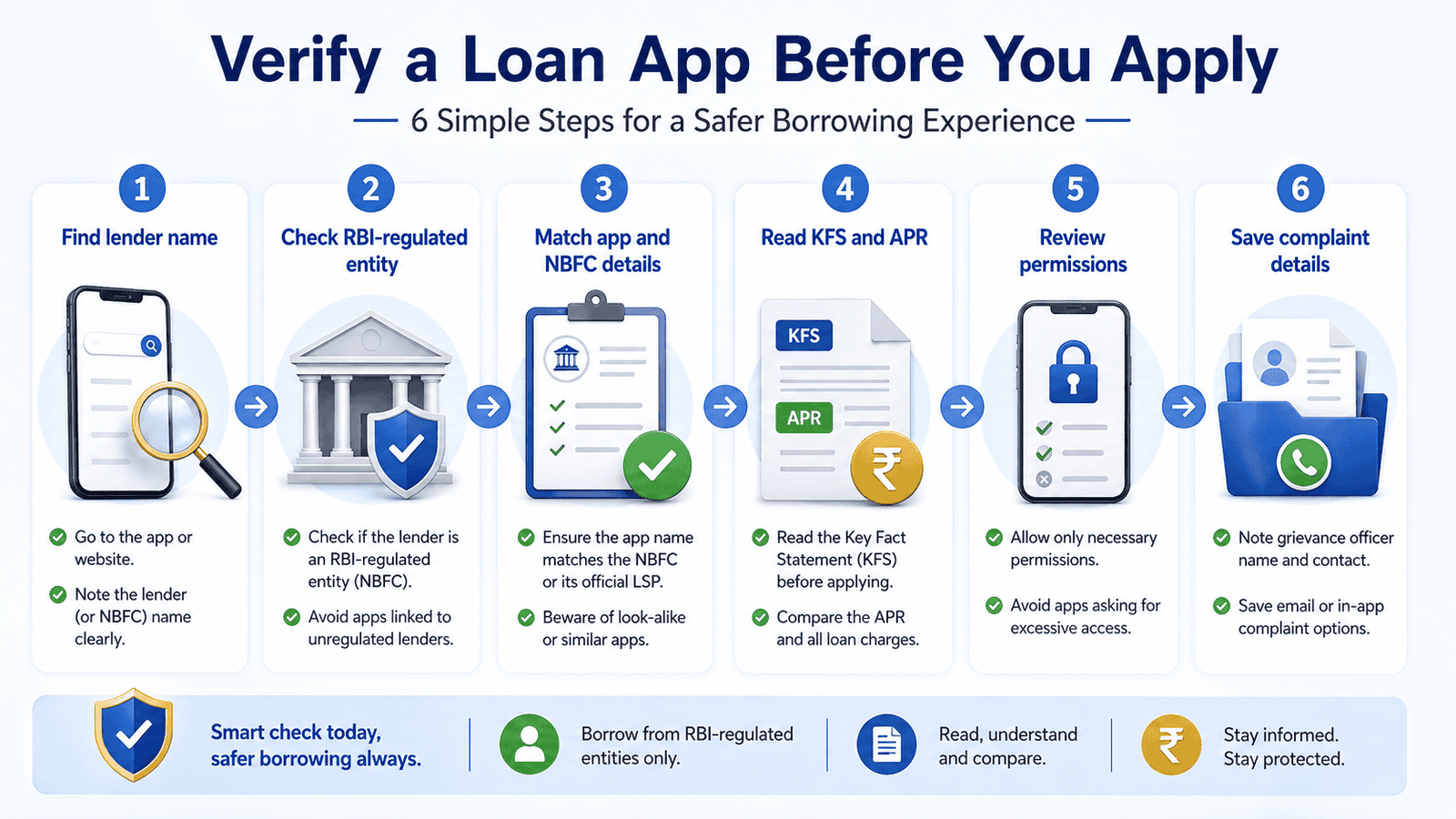
Loan App Safety Checklist — Before You Share Any Documents
| What to check | Where to check | Safe sign | Red flag |
|---|---|---|---|
| Lender name (bank or NBFC) | App profile, KFS, loan agreement, SMS after registration | Named bank or NBFC clearly stated | No lender name anywhere |
| RBI-regulated entity status | RBI website (rbi.org.in) or lender’s official website | Entity appears in RBI’s regulated entities list | Cannot find the lender on any official source |
| Key Fact Statement (KFS) | App, lender website, or pre-disbursal document | KFS shown before loan acceptance with all charges | No KFS, or charges shown only after disbursal |
| APR (Annual Percentage Rate) | KFS or loan summary document | APR clearly stated as a percentage per annum | Only a flat fee shown — APR hidden or missing |
| Grievance officer details | App settings, lender website, or KFS footer | Named officer, email, phone, or portal link provided | Only WhatsApp or chat support — no formal channel |
| App permissions requested | Android/iOS permissions screen at install or first use | Only camera, storage, or location if clearly explained | Contacts, gallery, call logs, SMS requested without reason |
For a broader pre-application walkthrough, see the safe loan checklist that covers what to do before uploading a single document.
Key Takeaways
- RBI licenses banks and NBFCs — it does not individually approve every loan app name. The phrase “RBI approved app” in an app’s own marketing is not a verified credential.
- Many loan apps operate as loan service providers (LSPs), meaning the real lender is a bank or NBFC operating in the background. If that lender’s name is not visible, that is a warning sign worth investigating before you borrow.
- The Key Fact Statement (KFS) must be shown to you before you accept a digital loan. It lists the total repayment amount, APR, processing fee, and repayment schedule in plain language — do not proceed without it.
- APR converts all charges into an annualized rate. A loan that looks cheap at ₹200 flat fee on ₹10,000 for 30 days can translate to an APR above 70% — meaning the total cost is much higher than the flat figure suggests.
- Contacts, gallery, SMS, and call-log permissions are not required for loan processing by a legitimate lender. Granting these permissions to an unverified app puts your personal data and relationships at serious risk.
- If anything feels suspicious — no lender name, no KFS, pressure to accept within minutes, or upfront fees — save screenshots immediately and do not share more documents until you have verified the entity.
- Complaint routes exist: the lender’s own grievance channel, the RBI complaint mechanism (where the lender is RBI-regulated), and the National Cyber Crime Portal at cybercrime.gov.in for fraud, threats, or data misuse.
Key Facts at a Glance
| Term | What it means | Why it matters to you |
|---|---|---|
| Loan app | A mobile application used to apply for and manage a loan | The app brand name is not the lender — the bank or NBFC behind it is |
| LSP (Loan Service Provider) | A technology company that operates the app on behalf of a bank or NBFC | The LSP is not the regulated lender — it only processes the application |
| Bank or NBFC | The RBI-regulated entity that actually lends the money | This is the entity you must verify — not the app name |
| KFS (Key Fact Statement) | A one-page loan summary with charges, APR, repayment schedule, and grievance details | Required before disbursal under RBI’s digital lending directions — KFS in digital loans explained in detail |
| APR (Annual Percentage Rate) | Total annualized cost of the loan, including fees and interest | Lets you compare true borrowing cost across apps — a flat fee looks small until you see the APR |
| Grievance officer | A named person or channel at the lender responsible for complaints | You must have a formal complaint route before you borrow — WhatsApp-only support is a red flag |
What “RBI Approved Loan App” Really Means
The search phrase “RBI approved loan apps” is one of the most common things Indian borrowers type before downloading an instant loan app. It reflects a genuine desire to borrow safely. But the phrase itself can be misleading — and some unsafe apps have used it deliberately.
Step 1 — Understand what RBI actually regulates
The Reserve Bank of India (rbi.org.in) licenses and regulates banks and Non-Banking Financial Companies (NBFCs). These are the entities that can legally lend money in India. RBI sets their capital requirements, fair practices code, interest rate disclosure rules, and digital lending conduct guidelines. What RBI does not do is approve, certify, or individually endorse every app that appears on the Google Play Store or Apple App Store.
Step 2 — Understand the app-LSP-NBFC structure
Many loan apps you see are not banks or NBFCs themselves. They are technology platforms — officially called Loan Service Providers — that partner with one or more RBI-regulated lenders. The LSP handles the app interface, customer acquisition, credit scoring, and sometimes recovery. The actual credit decision and loan disbursal comes from the bank or NBFC behind it. This means you can have a well-designed, professionally marketed loan app that is operated by an LSP whose lending partner is either a minor NBFC, or — in the case of unsafe apps — no regulated entity at all.
Step 3 — Why “RBI approved” text inside an app proves nothing
Some apps display “RBI registered” or “RBI approved” prominently on their home screen or marketing materials. This claim must always be traced back to the lender — the bank or NBFC — not the app itself. Ask: which specific bank or NBFC is lending this money? Is that entity’s name on the KFS? Can you find it on rbi.org.in or the lender’s own website? According to RBI’s digital lending directions, the lender’s name, and not just the app name, must be prominently disclosed at every stage of the loan process.
Step 4 — The relationship between the app, the LSP, and your rights
Under RBI’s framework for digital lending, the regulated lender (bank or NBFC) is ultimately responsible for the LSP’s conduct. This means that if an LSP app misrepresents charges, uses abusive recovery, or fails to provide a KFS, the complaint goes to the regulated lender — and from there, potentially to RBI’s complaint mechanism. Your rights under RBI’s Fair Practices Code apply at the lender level, not the app level. This is why identifying the real lender is the single most important step before applying.
Real Example: Priya from Bengaluru Checks Before She Borrows
Priya, 31, works as a front-desk executive at a hospital in Bengaluru and earns ₹32,000 per month. After an unexpected repair bill, she downloads an instant loan app that promises ₹10,000 in her account within minutes (illustrative amount — actual loan amounts depend on lender policy and your profile). The app looks polished and displays “RBI Registered” prominently on its splash screen.
Before uploading her PAN and Aadhaar, Priya scrolls to the app’s “About” section and finds a lender name she does not recognise. She opens a browser and searches for that NBFC name on rbi.org.in’s list of registered NBFCs. The entity appears in the list — a good sign. She then opens the app’s KFS before accepting the loan and sees a processing fee, interest charge, GST note, and APR figure. The total repayment amount is shown clearly. She also checks the grievance officer section — there is a named contact and an email address.
However, when the app asks for permission to access her contacts, gallery, and call logs during registration, Priya pauses. None of these permissions appear necessary for a loan, and the app does not explain why they are needed. She decides not to proceed and looks for a direct NBFC or bank app instead. The key insight: a legitimate lender’s identity and KFS can be verified — and unexplained permissions are always worth questioning before granting.
What a Legitimate Digital Loan Process May Ask For
A genuine RBI-regulated lender or a compliant LSP acting on its behalf may ask for certain documents and information as part of the application and KYC process. What they ask can vary by lender policy and loan type, so always verify current requirements at the lender’s official website before uploading anything.
- Identity proof: PAN card and Aadhaar-based e-KYC are commonly used for identity verification under regulated digital lending processes.
- Income proof: Salary slip, bank statement, or Form 16 may be requested depending on the lender’s credit assessment policy.
- Bank account details: Usually needed for disbursal and repayment mandate — typically via a bank account number and IFSC or a verified UPI handle.
- Selfie or video KYC: Many digital lenders use camera-based KYC under RBI-approved methods — camera permission for this purpose is standard.
- Location: May be requested for address verification, though this must be explained.
What no legitimate lender needs from your phone: access to your contact list, SMS inbox, call logs, or photo gallery. These are not required for identity, income, or credit assessment. If an app demands these permissions before showing you a KFS or even a lender name, that is a significant warning sign.
Why a Small Loan Can Cost Far More Than It Looks
One of the most important reasons to check the KFS and APR before accepting a digital loan is to understand the true cost. Short-term app-based loans often advertise a flat fee rather than an interest rate — and the fee looks small in isolation.
APR (approximate) = (Total charges ÷ Principal) × (365 ÷ Loan tenure in days) × 100
Where: Total charges = processing fee + interest + any other mandatory fee | Principal = amount disbursed | Tenure = number of days until repayment
Here is an illustrative example using figures that are not tied to any real lender — they are shown only to demonstrate the calculation logic. Verify all actual charges from your lender’s KFS before borrowing.
| Component | Illustrative amount | Note |
|---|---|---|
| Principal (loan amount) | ₹10,000 | Illustrative only |
| Processing fee (illustrative: 3%) | ₹300 | Verify at lender — can vary widely |
| Interest (illustrative: 2% flat for 30 days) | ₹200 | Flat rate — not reducing-balance |
| GST on fees (illustrative: 18% of fee) | ₹90 | May apply — confirm with lender |
| Total repayment (illustrative) | ₹10,590 | Illustrative — actual amount from KFS |
| Illustrative APR | ~59–75% p.a. | Annualised — small fee, high APR over 30 days |
The ₹590 in charges looks manageable on a ₹10,000 loan. Annualized, it becomes a very high APR. This is not illegal — short-term unsecured digital lending is priced for risk — but you deserve to know the real cost before you accept. The KFS must show you the APR. If it does not, do not accept the loan. For a full explanation of how APR is calculated on digital loans, see APR on digital loans.
Comparison: App vs LSP vs NBFC vs Bank — Who Does What
| Entity | Role in your loan | What you must verify |
|---|---|---|
| Loan app (brand name) | The interface you see and interact with — may be an LSP or the lender itself | Is the app operated by the lender directly, or is there an LSP? Who is the registered lender? |
| LSP (Loan Service Provider) | A tech company running the app on behalf of the actual lender — not the entity lending money | Which bank or NBFC is this LSP partnered with? Is that lender’s name in the KFS? |
| NBFC (Non-Banking Financial Company) | An RBI-regulated entity that can lend money but is not a bank — common behind many digital loan apps | Is the NBFC name visible in the app and KFS? Can you find it in RBI’s registered NBFC list at rbi.org.in? |
| Bank | An RBI-regulated and RBI-licensed institution — some banks operate their own loan apps or partner with LSPs | Is the bank name stated in the app and KFS? Does the loan agreement show the bank’s name? |
| You (the borrower) | The person legally responsible for repaying the loan and granting or denying permissions | Have you seen the KFS, APR, total repayment, and grievance channel before accepting? |
What to Do If You Already Borrowed From a Suspicious Loan App
If you have already taken a loan and the app’s conduct has become worrying — pressure tactics, threats, no clear lender name, or refusal to close the loan after repayment — take these steps calmly and in order.
Step 1 — Save everything immediately
Screenshot the app’s home screen, “About” or “Help” page, any lender name or NBFC registration number shown, the loan agreement, KFS if available, all SMS and push notifications, WhatsApp messages from recovery agents, and any repayment receipts. Do this before uninstalling the app — uninstalling does not erase your obligation but will remove the records.
Step 2 — Contact the lender’s grievance channel
If you can identify a bank or NBFC behind the app, contact their official grievance officer. The lender’s name, grievance officer details, and escalation path must appear in your KFS or on the lender’s official website. RBI’s digital lending framework makes the regulated lender responsible for the LSP’s conduct — so a formal complaint to the lender is the correct first step for most issues. For a full walkthrough on how to file a harassment complaint, see harassment complaint steps.
Step 3 — Use the RBI complaint mechanism where applicable
If the lender does not resolve your complaint within the time period they are required to respond, or if the lender itself is unresponsive, you may be able to escalate through RBI’s complaint mechanisms for regulated entities. The correct route depends on whether the lender is a bank or NBFC and the type of issue. Verify current complaint timelines and processes at rbi.org.in before filing.
Step 4 — Report to cybercrime.gov.in for fraud, threats, or data misuse
If the app has threatened you, impersonated a legal authority, misused your contacts to contact your family or colleagues, or appears to be a fraudulent entity with no real lender behind it, file a cybercrime report at cybercrime.gov.in or call the national helpline 1930. These channels cover digital fraud, online harassment, identity misuse, and unauthorized data access. Keep all your screenshots and evidence ready before filing.
What not to do
Do not pay a random “settlement amount” demanded via WhatsApp or chat without a formal written settlement letter from the lender on company letterhead. Do not share new documents, pay additional “processing fees,” or install further apps on demand from a recovery contact. If your contacts have already been accessed, see contacts access problem for a step-by-step response guide.
Complaint Route at a Glance
| Situation | First action | Possible official route |
|---|---|---|
| Disputed charge or wrong outstanding amount | Email the lender’s grievance officer with repayment proof | RBI complaint mechanism if lender is unresponsive — verify process at rbi.org.in |
| Abusive recovery calls or messages | Document all contacts and file a complaint with the lender’s grievance officer | RBI complaint mechanism; police complaint if threats continue |
| App accessed contacts and is messaging your family | Revoke app permissions immediately; document all messages | Cybercrime portal — cybercrime.gov.in or helpline 1930 |
| No real lender name — suspected fraud | Do not pay further; save all evidence | Cybercrime portal — cybercrime.gov.in or helpline 1930 |
| Loan not closed after repayment | Send repayment proof to lender grievance channel in writing | RBI complaint mechanism if regulated lender is involved — verify at rbi.org.in |
the app clearly shows a named bank or NBFC, the KFS is available before loan acceptance, APR is stated, the grievance officer is named, and app permissions are limited to camera and storage — proceed with the loan application, but read the full KFS before accepting.
the lender name is present but charges are unclear, the APR is missing from the KFS, or permissions seem excessive — pause, ask the lender to clarify in writing, and compare total repayment with at least one bank or NBFC alternative before deciding.
you cannot find a named bank or NBFC behind the app, there is no KFS, charges are only revealed after disbursal, or the app demands contacts and gallery access — do not proceed. Report the app to sachet.rbi.org.in and cybercrime.gov.in if you suspect fraud.
you need money urgently and the app looks suspicious — consider applying directly on the website of a bank or a major NBFC you recognise, rather than through a third-party app you cannot verify.
you have already given permissions or shared documents and the app’s behaviour has changed — save all evidence immediately and follow the complaint route in the section above before taking any further financial steps.
Common Mistakes to Avoid
Trusting “RBI approved” text inside the app without verifying the lender
An app can display “RBI registered” or “RBI approved” without any verification from RBI for that specific app name. The only claim worth trusting is the name of the actual bank or NBFC — and that must be traceable to RBI’s list of regulated entities at rbi.org.in.
Always search the lender name directly rather than relying on the app’s self-description. Take three minutes to check rbi.org.in or the lender’s own website before uploading any document.
Skipping the KFS because you need money urgently
Urgency is the most common reason borrowers accept a loan without reading the KFS. The KFS is a short document — typically one page — that shows the total repayment amount, APR, processing fee, repayment date, and grievance contact. Skipping it means you may not know the real cost until the money is already in your account and the repayment obligation is active. Under RBI’s digital lending framework, a lender that disburses without giving you the KFS is not following the rules — that itself is a signal to stop.
Granting contacts, gallery, or SMS permissions without asking why
Loan processing by a regulated lender does not require access to your contact list, photo gallery, SMS history, or call logs. Granting these permissions to an unverified app gives it the ability to harvest personal data about you and everyone in your contacts — data that can be misused for harassment during recovery. If the app requests these permissions and does not clearly explain the reason, deny them.
Check fake app warning signs for a detailed list of permission-related red flags across known unsafe app patterns.
Paying upfront fees before receiving the loan
A legitimate lender deducts processing fees from the disbursed amount — they do not ask you to pay a fee to an outside bank account, UPI ID, or wallet before releasing the loan. “Pay ₹500 to unlock your loan” is a classic fraud pattern. No RBI-regulated lender uses this model.
Deleting the app and all evidence after harassment starts
Once a loan app starts sending abusive messages or contacting your family, the instinct is often to delete everything. This is the worst time to do it. Evidence — screenshots, SMS records, call logs, WhatsApp messages — is exactly what a cybercrime complaint or grievance filing requires. Save and back up everything before you uninstall or block any contact.
Assuming the Play Store presence means safety
The Google Play Store or Apple App Store does list apps and removes some known violators after complaints. But presence on a store does not mean the app’s lending partner is RBI-regulated, its KFS is accurate, its charges are fair, or its recovery behaviour is legal. Do not treat store availability as a safety certificate.
When This May Not Be the Right Choice
A digital loan app — even one backed by an RBI-regulated lender — may not be the right borrowing option if:
- The lender name is absent from the app, the KFS, and any official document — this means you cannot verify who you are borrowing from or where to complain.
- The app hides the APR or only shows a flat fee — you cannot make an informed decision about the real cost of borrowing.
- You are already repaying one or more app-based loans at high APRs and are considering a new one only to repay the existing loan — this cycle significantly increases your total debt burden.
- You are already under financial stress and the loan amount would push your total monthly EMI obligations beyond a level your income can support — a personal loan at 40%+ APR from a digital app is not a solution to debt stress.
- The app’s recovery behaviour before you have even taken the loan — pressure to decide in minutes, countdown timers, fake “approval expiry” warnings — suggests the same tactics will intensify during repayment.
If any of these apply to your situation, it may be worth exploring other options before committing.
Official Rules and Where to Verify
Use these official sources — and only these — to verify lender details, check regulatory status, or report a problem. Do not rely on third-party lists, app marketing, or social media claims.
| Item to verify | Source to check | Why it matters |
|---|---|---|
| Whether a bank or NBFC is RBI-regulated | RBI — rbi.org.in (regulated entities section) | Confirms the lender has a valid RBI licence or registration |
| Digital lending conduct and KFS rules | RBI — rbi.org.in (digital lending directions and master directions) | Shows what a compliant lender must disclose before disbursal |
| Suspicious financial entities and awareness | RBI Sachet Portal — sachet.rbi.org.in | Lets you check alerts and report suspicious entities operating without authorisation |
| App/LSP partnership and grievance officer details | Lender’s official website (lender domain) | Confirms the app is a recognised LSP and that the grievance route is legitimate |
| Fraud, cybercrime, data misuse, or threats | National Cyber Crime Portal — cybercrime.gov.in or helpline 1930 | Correct reporting channel when a loan app crosses into criminal behaviour |
Rules, rates, charges, and eligibility conditions can change. Always verify current details from the official source, lender, or relevant regulator before making a financial decision.
Expert Tips
- Search the lender name, not only the app name. Type the NBFC or bank name found in the app into rbi.org.in’s registered entity search. If the name does not appear or the search returns no match, that is a firm stop sign. The app’s marketing name tells you nothing on its own. If you have been given access to your contacts, see contacts access problem for immediate steps.
- Compare the KFS lender name with the app’s claim. Some apps display one lender name on the splash screen but a different entity name in the KFS or loan agreement. If these do not match, contact the app’s support to clarify before accepting the loan — a mismatch is unusual and worth questioning.
- Take screenshots before accepting the loan. Capture the KFS screen, the total repayment amount, the APR, the processing fee, and the grievance officer section before you tap “Accept.” These screenshots are your evidence record if the final deduction or repayment demand differs from what was shown.
- Check whether the app gives you a proper repayment schedule. A legitimate lender must give you a repayment schedule that shows your due date, amount due, and breakdown of principal and interest or charges. If you only receive an amount to pay with no written breakdown, that is an incomplete disclosure.
- Be cautious of any disbursal pressure before you finish reading. Phrases like “your offer expires in 10 minutes” or “confirm now to lock your rate” are designed to prevent you from reading the KFS carefully. Legitimate lenders do not need to rush you. If the pressure feels extreme, that is a reason to slow down, not speed up.
- Check the app’s grievance route before you need it. A formal grievance channel — a named officer, an email address, or a complaint portal — should be visible before you apply, not only after a problem occurs. If you cannot find it during the application process, ask support for the details in writing.
Frequently Asked Questions
Does RBI approve loan apps directly?
No. RBI regulates banks and NBFCs — the entities that actually lend money. It does not individually approve, certify, or endorse app names. An app that claims to be “RBI approved” is referring — or should be referring — to the regulated status of the bank or NBFC lending the money, not the app itself. Always verify the lender, not the app branding.
How do I check if an NBFC is registered with RBI?
Go to rbi.org.in and look for the list of registered NBFCs. Search using the company name you found in the app or KFS. RBI maintains lists of registered NBFCs and also publishes cancellations — so you can check both active and cancelled registrations. If the NBFC name does not appear, do not proceed until you have clarified the entity’s status.
Is a loan app automatically safe if it is available on the Google Play Store?
No. The Play Store presence means Google has allowed the app onto its platform — it does not verify the app’s RBI licence, KFS accuracy, charge transparency, or recovery conduct. Many apps removed by Google after regulatory action were available on the Play Store for extended periods before removal. Use the Play Store to download an app you have already verified through other means — not as a safety certificate in itself.
What is an LSP in digital lending?
An LSP, or Loan Service Provider, is a technology company that operates a loan app on behalf of an RBI-regulated bank or NBFC. The LSP handles the customer interface, application flow, and sometimes credit scoring — but it is not the lender. The loan agreement and KFS must name the regulated lender (bank or NBFC), not just the LSP’s app brand.
What should I look for in the Key Fact Statement before taking a loan?
The KFS must show: the lender’s name, the loan amount, the APR (annualized rate), all fees and charges broken down, the repayment schedule with due dates, and the grievance officer’s contact details. If any of these are missing, the KFS is incomplete. Do not accept a loan without a full KFS — under RBI’s digital lending directions, you are entitled to receive it before disbursal.
What is APR and why does it matter more than the flat fee?
APR — Annual Percentage Rate — converts all loan costs into a single annualized percentage so you can compare loans fairly. A flat fee of ₹200 on a ₹10,000 loan for 30 days looks small, but annualized it can exceed 70–80% APR. Without APR, short-tenure app loans can appear cheap while being significantly more expensive than a bank personal loan on an annualized basis. The KFS must state the APR clearly.
What should I do if a loan app threatens me or contacts my family?
Save all evidence — screenshots, call logs, and messages — immediately. File a complaint with the lender’s grievance officer if the lender is identifiable. If threats continue or the app appears fraudulent, report at cybercrime.gov.in or call 1930. Do not pay any demand made via WhatsApp, chat, or unknown accounts without a formal written settlement from the lender. Recovery agents are bound by RBI’s Fair Practices Code — abusive contact is a violation, not a legitimate collection method.
Can I trust an app if a friend recommended it?
A friend’s positive experience does not mean the app is RBI-regulated, that its charges are fair for your loan amount and tenure, or that its behaviour during recovery will be appropriate. Friends may have borrowed under different terms or amounts. Always run your own verification checklist — lender name, KFS, APR, grievance channel — before applying, regardless of who recommended the app.
Final Verdict
Checking whether a loan app is genuinely connected to an RBI-regulated entity is a step every borrower should take before sharing a single document — and it takes less time than most people assume. The core rule is simple: find the bank or NBFC behind the app, verify that entity is RBI-regulated, read the KFS, check the APR, review the permissions, and confirm the grievance officer exists before you tap Accept. If the lender name is missing, the KFS is absent, or the app demands access to your contacts without explanation — those are reasons to stop and verify further, not reasons to rush through. Borrowers who feel urgency are exactly the people fake loan apps target. Taking five minutes to check how to check if a loan app is RBI approved protects your data, your credit record, and your family’s contact information. If something has already gone wrong, the complaint routes at cybercrime.gov.in, sachet.rbi.org.in, and your lender’s grievance channel exist precisely for that situation.
Always verify the latest rules, charges, and terms from the relevant official source or provider before making a financial decision.
This article is for educational purposes only and should not be treated as personalised financial, credit, tax, or legal advice. Rules, rates, charges, eligibility criteria, and product terms can vary by provider and may change over time. Please verify current details from official sources, the relevant provider, or a qualified professional before making any financial decision.

Arjun writes clear borrower-safety guides on digital loan apps, RBI digital lending rules, KFS, APR, LSPs, loan app harassment, cybercrime complaints, CIBIL impact, and safer borrowing choices. He focuses on helping Indian borrowers understand risks, protect their data, compare lenders carefully, and use official complaint channels when needed.