

You paid your EMI on time — or even cleared the full loan amount — but the app still shows a balance due. Maybe it is ₹2,000 as a late fee you never expected, or the closure amount you transferred three days ago is still marked pending. The loan app is not updating, and recovery reminders are already piling up. If this is happening to you, the most important thing to know right now is this: do not pay again based only on what the app screen shows. A loan app showing a wrong outstanding amount is a real and fairly common problem in India’s digital lending space. It can happen because of genuine technical delays, system reconciliation issues, or incorrect charge calculation — and in some cases, it may point to something more serious. The right response is not panic payment. It is proof collection, written verification, and a clear escalation path if the lender does not respond.
Quick Answer: Loan App Showing Wrong Outstanding Amount
Loan app showing wrong outstanding amount means the balance in the app does not match your payment proof, KFS, or loan statement. Before paying extra, save screenshots, payment UTR, receipts, and repayment schedule, then ask the regulated lender or NBFC for a written breakup. Escalate if unresolved.
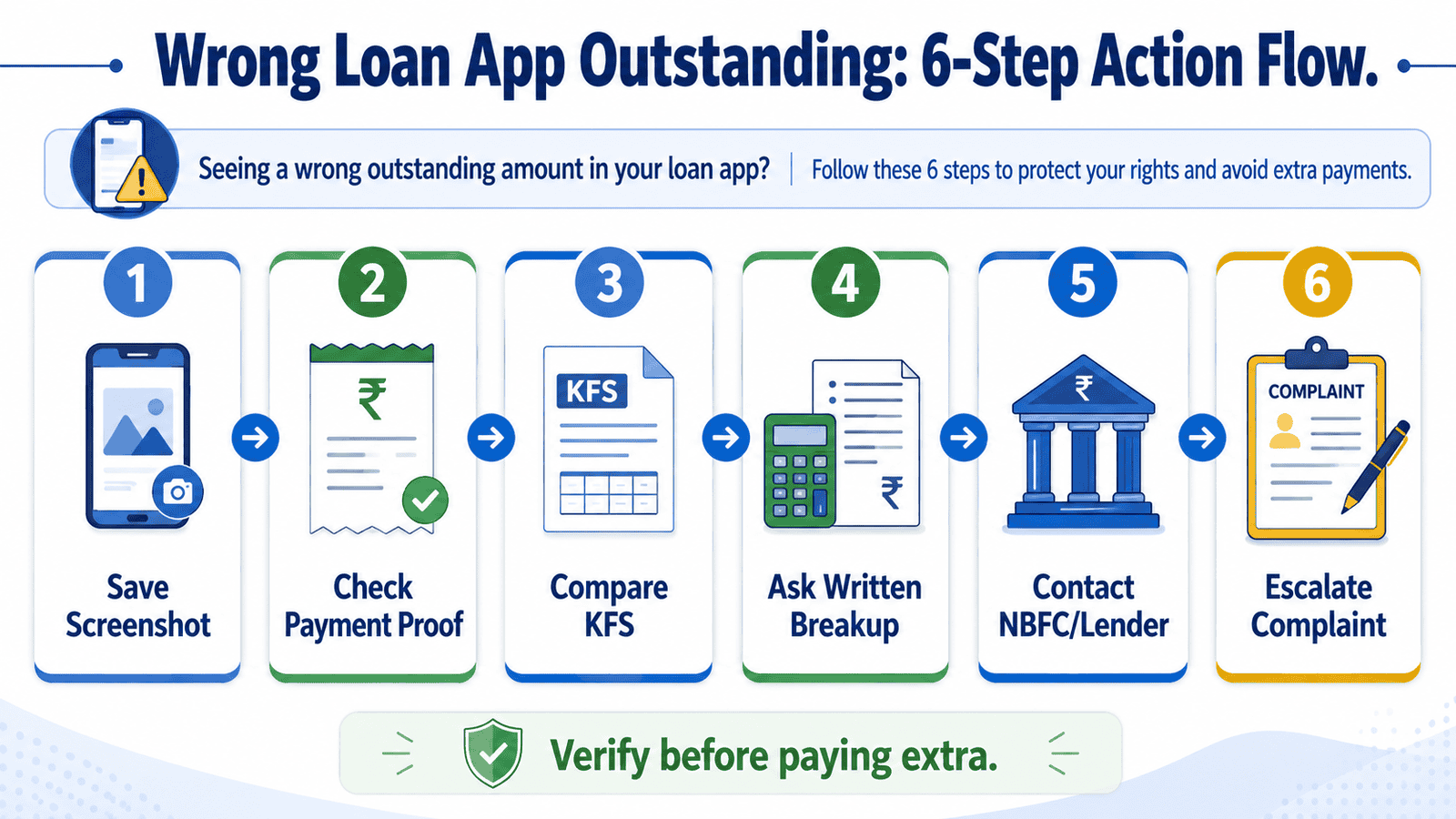
Immediate Steps: Do This Before Paying Any Extra Amount
The moment you notice a mismatch between what you paid and what the app shows, stop and do the following. This is not the time to call the recovery helpline and agree to pay — it is the time to build your evidence file.
Step 1 — Take screenshots of the app immediately
Capture the current outstanding amount, the repayment history screen, and any recovery notification or message within the app. Do not clear app cache, uninstall the app, or delete any messages. The app screen as it stands right now is evidence.
Step 2 — Confirm the bank debit
Open your bank statement or bank app and check whether the payment was actually debited from your account. Note the exact date, amount, and UTR or reference number of the transfer. If the bank shows the debit and the loan app does not reflect it, you have the core of your dispute right there.
Step 3 — Locate your payment receipt and loan ID
Most digital loan apps generate a payment receipt or send a confirmation SMS when an EMI or closure payment is processed. Find it and save it. Your loan account number or loan ID is usually in the app profile or sanction letter — note it down.
Step 4 — Pull out your KFS and repayment schedule
The Key Fact Statement and repayment schedule you received at the time of disbursal show your agreed charges, EMI amounts, and due dates. Compare the amount shown in the app against these documents. If the mismatch involves a penalty or fee that is not mentioned in the KFS, that is a red flag worth documenting. You can read your KFS carefully to understand exactly what charges are permitted.
Step 5 — Do not pay through any unofficial link
Do not transfer money to a personal UPI ID, scan a QR code sent by a recovery agent on WhatsApp, or use a payment link that did not come from the official app. If the outstanding amount is genuinely wrong, an unofficial payment will not fix it and may make your dispute far harder to prove.
Key Takeaways
- The app screen alone is not legal proof of what you owe — always cross-check with your bank debit record, official payment receipt, and the KFS your lender issued at disbursal.
- A digital loan app may only be the customer interface; the actual regulated lender or NBFC maintains the official loan account, and their written statement carries more weight than an app notification.
- Before paying any disputed amount, ask for a written breakup showing principal outstanding, interest accrued, applicable penalty, bounce charges, GST, and total payable — this is your right as a borrower under RBI’s Fair Practices Code.
- Genuine dues should not be ignored; if your KFS and payment history confirm that an amount is legitimately owed, pay it through the official channel and note the UTR.
- If recovery messages, threats, or pressure for unofficial payment begins alongside a wrong outstanding amount, treat it as a safety issue and escalate to the cybercrime portal at cybercrime.gov.in in addition to the lender complaint channel.
- A wrong overdue entry reported to a credit bureau such as TransUnion CIBIL can damage your credit score; if the dispute is unresolved and you suspect incorrect reporting, pull your credit report and monitor it.
Key Facts at a Glance
| Situation | First Proof to Collect | First Contact to Make |
|---|---|---|
| App balance not updated after EMI payment | Bank debit record, UTR, app payment receipt | App in-app support or official helpline |
| Late fee or penalty shown without basis | KFS, repayment schedule, payment date proof | Regulated lender or NBFC grievance channel |
| Closure amount paid but loan still shows active | Closure receipt, bank debit, foreclosure letter if any | Regulated lender — email or official portal |
| Part-payment not adjusted correctly | Part-payment receipt, revised schedule requested | Regulated lender in writing |
| App unresponsive and balance unexplained | All of the above plus complaint ticket number | RBI Complaint Management System — cms.rbi.org.in |
| Threats, unofficial payment links, or impersonation | Screenshots of messages, sender number, app name | National Cyber Crime Portal — cybercrime.gov.in |
Why a Loan App May Show the Wrong Outstanding Amount
Not every mismatch is fraud. Most wrong outstanding amounts in digital loan apps fall into one of a few identifiable categories. Understanding which one applies to your situation helps you choose the right response.
Payment processing delay or reconciliation lag
When you pay an EMI through a third-party UPI app, net banking, or the loan app itself, the payment clears in your bank but may take time to reflect in the lender’s system. This reconciliation delay can range from a few hours to two or three business days. If you have a bank debit record and UTR but the app still shows dues, this is often the first explanation to check. If the amount does not update within two to three working days, escalate. If you are concerned that a fully settled loan is not being closed, the guide on loan not closing after payment walks through that specific scenario in detail.
Incorrect late fee or bounce charge added
Some apps automatically apply a late payment fee or bounce charge even when the payment was made on time or when the bounce was caused by a banking error. If your bank statement shows the debit went through before the due date, a late fee in the app is an incorrect charge. This needs a written complaint to the regulated lender, not a silent payment.
Part-payment not applied to principal correctly
When a borrower makes a part-prepayment, the lender is required to apply it in a disclosed manner — usually to the outstanding principal, which then reduces future EMIs or the tenure. If the app still shows the full outstanding after a part-payment, request a revised repayment schedule from the lender in writing and compare it with the app balance.
Foreclosure or closure amount calculated wrongly
If you paid a closure amount quoted by the app or lender but the loan still shows an outstanding balance, it is possible the closure quote did not include interest up to the actual payment date, or that a foreclosure charge was added after the quote was given. Ask for a written confirmation showing principal, interest up to the closure date, foreclosure charge if applicable, and any GST component — and compare it to what you paid.
App and lender system mismatch
In the digital lending ecosystem in India, a loan app may be operated by a Lending Service Provider — an LSP — that is different from the regulated bank or NBFC actually disbursing and holding the loan. If the LSP’s app system and the regulated lender’s core banking system are not fully synchronised, the balance displayed in the app may not match the actual loan account. According to RBI’s digital lending guidelines, the regulated entity remains responsible for the loan account, so the lender’s statement or official communication takes priority over the app screen.
Overcharging or unexplained fees
In some cases, borrowers are charged fees or penalties that were not disclosed in the KFS at disbursal. RBI’s Fair Practices Code requires all charges to be disclosed upfront. If you see a charge in the app that has no corresponding entry in your KFS, that is a legitimate grievance to raise in writing with the lender.
Real Example: Rahul’s Late Fee Dispute in Pune
Rahul, 29, works as a junior accounts executive in Pune and earns around ₹45,000 per month. He took a short-term personal loan of ₹25,000 from a digital loan app and was paying a monthly EMI of approximately ₹4,800. In his fourth month, he transferred the EMI on the 4th of the month — two days before the due date — through his UPI app. His bank statement clearly showed the debit with a UTR reference on the 4th.
Three days later, the loan app showed an outstanding amount that included a late fee of ₹600 (illustrative figure). Rahul called the app’s helpline, but the agent only repeated that a late fee was applicable without explaining why. Rahul did not pay immediately. Instead, he took a screenshot of the outstanding screen, saved his bank statement, and found the UTR number. He then identified the regulated NBFC behind the app by checking the loan agreement he had received at disbursal. He sent an email to the NBFC’s official grievance email ID with the bank debit date, UTR, and a clear statement that the EMI had been paid two days before the due date and that the late fee appeared to be incorrectly applied. The NBFC responded within a few working days, confirmed the error, and reversed the late fee. Rahul’s actual outstanding was ₹nil for that month.
The key insight: the moment Rahul identified the regulated NBFC separately from the app and raised the complaint in writing with evidence, the dispute was resolved without any extra payment. To identify the regulated entity behind any loan app, you can check if the app is RBI-linked before escalating.
Evidence Checklist: What to Collect Before Raising a Complaint
| Evidence Item | Where to Find It | Why It Matters |
|---|---|---|
| Screenshot of wrong outstanding amount | Loan app home or repayment screen | Documents the disputed balance with timestamp |
| Bank debit record with date | Bank passbook, net banking, or bank app statement | Proves the payment left your account before or on due date |
| UTR or transaction reference number | Bank SMS, UPI app transaction history, or bank statement | Unique proof of the specific payment transaction |
| Payment receipt from the loan app | App transaction history or SMS from lender | Confirms the lender’s system received or should have received the payment |
| Loan account number or loan ID | Loan app profile, sanction letter, or KFS | Required to file any formal complaint or written request |
| KFS (Key Fact Statement) | Document shared at disbursal by the app or lender | Shows agreed charges — helps identify any unauthorised fee |
| Repayment schedule | App or lender document at disbursal | Shows due dates and EMI amounts for comparison |
| App support ticket number or chat screenshot | App support section or email inbox | Shows that you raised the issue and the response received |
| Recovery messages or calls received | SMS, WhatsApp, app notifications | Relevant if wrong dues led to inappropriate recovery pressure |
How to Calculate Whether the App Amount Is Correct
You do not need complex tools to verify whether the outstanding amount shown in the app is right. A basic comparison is usually enough to identify whether the dispute is real.
For an EMI dispute
Outstanding After EMI = Previous Outstanding − (EMI Paid − Interest Component)
Where: Previous Outstanding = balance before the EMI month | Interest Component = monthly reducing-balance interest on previous outstanding | EMI Paid = amount confirmed debited from bank
For example (illustrative figures only): if your outstanding before the EMI month was ₹18,000 and your EMI was ₹4,800, of which roughly ₹300 was interest on the remaining principal at the applicable rate, then the principal reduction should be approximately ₹4,500. Your new outstanding should be around ₹13,500. If the app shows ₹15,500 including a ₹2,000 late fee, the disputed amount is that ₹2,000 fee, and your bank debit date is the document that either supports or refutes it.
For a closure amount dispute
When you pay a foreclosure amount, ask the lender to confirm the calculation as: principal outstanding on closure date + interest accrued to that date + foreclosure charge (if any, and only if disclosed in the KFS) + applicable GST. If the app balance after your closure payment shows anything beyond this formula, request a written explanation of every component. Understanding how APR and total cost work in digital loans can help you verify whether the interest and charges being claimed are consistent with what you agreed to.
| Scenario | What to Compare | Red Flag If You See |
|---|---|---|
| EMI paid, app shows late fee | Bank debit date vs loan due date from KFS | Debit date is before due date — late fee not justified |
| Closure paid, loan still active | Closure receipt vs principal + interest + charge formula | Unexplained extra amount above the closure quote |
| Part-payment made, balance unchanged | Part-payment receipt vs revised repayment schedule | Balance not reduced at all after confirmed debit |
Wrong Outstanding: Likely Cause, Proof, and Next Action
| Possible Reason | Proof to Check | Next Action |
|---|---|---|
| Payment not yet reconciled | Bank debit date and UTR | Wait two to three working days; if unresolved, raise app support ticket |
| Late fee added despite on-time payment | Bank debit date vs KFS due date | Email regulated lender with debit proof and UTR; request fee reversal |
| Bounce charge on a payment that cleared | Bank debit confirmation and lender’s bounce record | Request lender’s written evidence of the bounce event; dispute if incorrect |
| Part-payment not applied to principal | Part-payment receipt vs revised schedule | Request revised repayment schedule in writing from lender |
| Closure amount under-quoted by app | Closure quote vs actual payable formula | Ask for written closure breakup; pay only after written confirmation |
| Unauthorised charge not in KFS | KFS vs charges shown in app | Raise formal grievance with regulated lender; escalate to RBI CMS if unresolved |
How to Complain: The Safe Escalation Path
If verifying your proof shows the outstanding amount in the app is wrong, follow this escalation path in order. Do not skip steps — official complaint channels such as RBI CMS expect you to have first approached the lender.
Step 1 — Raise a ticket with app in-app support
Use the app’s built-in support or official helpline to raise a complaint. State the loan ID, the disputed amount, the UTR of your payment, and the date of your bank debit. Request a written response — not just a verbal assurance over a call. Save the ticket number.
Step 2 — Email the regulated lender or NBFC’s grievance channel
The loan app may be operated by an LSP, but the regulated lender or NBFC behind it is legally responsible for the loan account. Find the lender name in your sanction letter, KFS, or loan agreement. Look up their official grievance email or Grievance Redressal Officer contact on their website. Email the complaint with all your evidence attached. Ask for a written breakup of the outstanding amount showing principal, interest, penalty, bounce charges, GST, and total payable.
Step 3 — Escalate to RBI Complaint Management System
If the regulated lender has not resolved the complaint within the timeframe they are required to adhere to, you may escalate to the RBI Complaint Management System at cms.rbi.org.in. This route applies when the lender is a bank or an RBI-registered NBFC. A detailed walkthrough of the process is available in the RBI complaint process guide. Keep your lender complaint ticket number and all correspondence ready before filing.
Step 4 — Use Sachet for suspicious or unregulated entities
If you are unsure whether the app or lender is regulated by RBI, or if the entity appears suspicious, report it at sachet.rbi.org.in. The Sachet portal is specifically designed for reporting unregistered or questionable financial entities operating in India.
Step 5 — File at National Cyber Crime Portal for fraud or threats
If the wrong outstanding amount is accompanied by threats, phishing links, impersonation of official agencies, demands for payment to personal accounts, or any other behaviour that suggests criminal intent, file a complaint at cybercrime.gov.in. This is separate from the lender complaint and should be done in addition to, not instead of, the lender escalation.
| Channel | Use When | What to Attach |
|---|---|---|
| App in-app support | First step for any mismatch, balance error, or update delay | Loan ID, UTR, screenshot of wrong balance |
| Regulated lender / NBFC grievance | App support does not resolve in writing; incorrect charge confirmed | Bank debit proof, UTR, KFS, full evidence file |
| RBI CMS — cms.rbi.org.in | Regulated lender has not resolved within their stated period | Lender ticket number, email trail, evidence file |
| Sachet — sachet.rbi.org.in | Entity appears unregistered or suspicious | App name, lender identity details, screenshots |
| Cybercrime portal — cybercrime.gov.in | Threats, fake payment links, impersonation, or extortion | Screenshots of messages, sender numbers, payment link URLs |
Safety Checklist: Protect Yourself While the Dispute Is Open
| Situation | Safe Action | Unsafe Action |
|---|---|---|
| App shows extra due amount | Screenshot it, save UTR, ask for written breakup | Pay immediately to stop notifications without verification |
| Recovery agent asks for UPI payment | Request official payment channel from the regulated lender | Transfer to personal UPI ID or scan agent’s QR code |
| Recovery call offers to close account if you pay now | Ask for the offer in writing on lender letterhead or email | Pay over phone without written confirmation |
| App sends a payment link via SMS or WhatsApp | Verify the link domain matches the official lender website | Click and pay through an unverified link |
| Evidence is in app chats, SMS, or email | Screenshot and save offline or back up to cloud | Delete app, clear chats, or factory reset phone |
| OTP requested to “clear outstanding” | Never share OTP with anyone — report immediately | Share OTP thinking it will correct the balance |
How to Decide What’s Right for You
Your bank statement shows the payment was debited before or on the due date and the UTR is valid — do not pay the disputed amount. Raise a written complaint with the regulated lender and wait for a written response.
The app shows a late fee or penalty that is not mentioned anywhere in your KFS — treat it as an unauthorised charge. Ask for a written breakup and dispute it through the lender’s grievance channel.
The lender provides a written breakup that matches the KFS and shows the outstanding is accurate — pay the legitimate amount through the official channel and save the receipt.
The lender does not respond to your written complaint within a reasonable period — escalate to the RBI Complaint Management System at cms.rbi.org.in with your evidence and ticket number.
Recovery messages include threats, fake payment links, or demands to pay an unverified agent — escalate to the cybercrime portal immediately at cybercrime.gov.in and simultaneously inform the regulated lender in writing.
You are certain the outstanding is legitimate — for example, you genuinely missed the EMI due date or the KFS clearly shows the charge — then avoiding payment will lead to more penalties, possible CIBIL overdue marking, and escalation by the lender. Pay through the official channel, save the UTR, and request a receipt.
Common Mistakes to Avoid
Paying extra without asking for a written breakup
Many borrowers pay the app balance immediately to stop recovery messages, without first confirming whether the amount is correct. Once you pay, it becomes much harder to claim a refund or dispute the charge. Always ask for a written breakup of every component before paying a disputed amount.
Relying only on phone-call assurances
A recovery agent or app helpline agent may tell you verbally that the balance will be corrected or that a fee has been waived. Phone calls leave no trail. If a resolution is promised, ask for it in writing by email or an official support ticket before taking any action.
Deleting the app, chats, or SMS messages
App notifications, recovery messages, and payment SMS are your evidence. Deleting the app, clearing chats, or resetting your phone removes the very proof you need to dispute the wrong outstanding amount. Back up screenshots and messages before anything else.
Paying through a recovery agent’s personal UPI link
If you pay to a personal UPI ID or WhatsApp QR code provided by a recovery caller, the payment may not reach the lender’s system at all. The app balance will still show dues and you will have no official record. Use only the payment channel inside the official app or the lender’s website.
Filing the wrong type of complaint without identifying the lender
Filing an RBI CMS complaint without first identifying the regulated lender, or filing a cybercrime complaint for what is actually a billing dispute, can slow down resolution. Identify the regulated NBFC or bank behind the app first, raise a formal grievance with them, and then escalate to the right channel.
Assuming the balance will auto-correct without follow-up
Reconciliation delays do sometimes resolve on their own, but if your bank debit is confirmed and two to three working days have passed with no update, the issue needs an active written complaint — not passive waiting. Silent waiting leaves room for overdue reporting to credit bureaus.
Ignoring the issue because the amount is small
A ₹200 incorrect late fee that goes uncontested may eventually get reported as overdue to TransUnion CIBIL or another credit bureau. A small unresolved dispute can create a CIBIL overdue mark that affects your loan eligibility for the next several years. Small amounts deserve the same written follow-up as large ones.
When This May Not Be the Right Choice
Disputing an outstanding amount through formal complaint channels may not be the most effective path in every situation. Consider whether your circumstances match any of these before escalating:
If you actually missed the EMI due date and the late fee is clearly disclosed in your KFS as a consequence, paying through the official channel and noting the UTR is the right action — not a dispute.
If the app has already confirmed in writing that the reconciliation will update within a day or two and the window has not closed yet, waiting may be the most efficient response before filing a formal complaint.
If the KFS and your own repayment schedule confirm that the balance shown in the app is accurate — for example, because you made a part-payment and the remaining principal is exactly what the app shows — disputing it will delay resolution without outcome.
If the balance difference is caused by a GST component on fees that was disclosed in the KFS but not immediately visible in the app’s simplified display, the amount may be accurate even if it looks unfamiliar — ask for a breakup first, then decide.
If any of these apply to your situation, it may be worth exploring other options before committing.
Official Rules and Where to Verify
The following are the authoritative sources for verifying borrower rights, complaint processes, and lender obligations in India’s digital lending space. Understanding RBI digital lending rules helps you know exactly what protections apply to your loan.
- RBI — rbi.org.in: Primary regulatory authority for banks and NBFCs in India. RBI’s Digital Lending Guidelines and Fair Practices Code govern how regulated lenders must communicate charges, handle repayments, and address grievances. Verify current circular references and applicable rules here.
- RBI Complaint Management System — cms.rbi.org.in: The official portal for filing complaints against RBI-regulated entities such as banks and NBFCs. Use this channel after exhausting the regulated lender’s grievance process.
- RBI Sachet Portal — sachet.rbi.org.in: For reporting suspicious financial entities, unregistered lenders, or loan apps that do not appear to be backed by a regulated entity.
- National Cyber Crime Portal — cybercrime.gov.in: The official channel for reporting online fraud, threats, phishing, impersonation, or any criminal conduct linked to a loan app dispute. Not intended for ordinary billing disputes — use it when criminal conduct is present.
- TransUnion CIBIL — transunioncibil.com: Check your credit report if you suspect a wrong outstanding amount has been reported as overdue or if your CIBIL score has dropped unexpectedly during an unresolved dispute.
Rules, rates, charges, and eligibility conditions can change. Always verify current details from the official source, lender, or relevant regulator before making a financial decision.
Expert Tips
- Create a single evidence folder on your phone the moment you notice a balance mismatch — name it with the loan ID and date. Keep screenshots, bank statements, UTR records, KFS, and all correspondence in one place so you are not searching for files when you need them urgently.
- When raising a written complaint, ask for a specific, itemised breakup in one message: “Please share the principal outstanding, interest accrued to date, penalty or late fee with the basis for calculation, bounce charge if any, GST component, and total payable as of today.” This forces a structured reply that is easier to dispute or verify.
- Use email or the app’s official ticketing system for all communication — not WhatsApp or phone calls. An email with a ticket number is evidence; a phone conversation is not.
- Note the date and time you raised each complaint and the date you received or did not receive a response. This timeline is essential if you need to escalate to RBI CMS and demonstrate that you gave the lender an opportunity to resolve the issue first.
- If a wrong overdue entry appears in your credit report as a result of the dispute, pull your full credit report from TransUnion CIBIL or one of the other three bureaus — Experian India, CRIF High Mark, or Equifax India — and raise a dispute with the bureau in addition to the lender complaint. The bureaus have a process for investigating lender-reported inaccuracies.
- Do not mention legal action or consumer court threats in your first complaint email. A calm, evidence-led complaint with a clear request for a written breakup is resolved faster and positions you as a serious borrower, not a difficult one.
Frequently Asked Questions
Why is my loan app showing a wrong outstanding amount after I paid my EMI?
The most common reasons are a payment reconciliation delay of two to three working days, an incorrect late fee or bounce charge applied by the system, or a mismatch between the app’s display and the regulated lender’s actual loan account. Check your bank debit date, UTR, and KFS, and raise a written complaint with the lender if the app does not update within two to three working days.
Should I pay the extra amount shown in the loan app to avoid further penalties?
No — not without a written breakup. If your payment proof is clear and the extra amount has no basis in your KFS or repayment schedule, paying it without a written explanation may not resolve the issue and makes it harder to claim a refund later. Ask the regulated lender for a written itemised breakup first. Pay only if the amount is confirmed as legitimate.
What proof is needed to dispute wrong loan dues in a digital loan app?
You need: a screenshot of the wrong outstanding amount in the app, your bank debit record and UTR, the payment receipt from the app, your loan account number or loan ID, the KFS from disbursal, and the repayment schedule. If recovery messages are also part of the picture, save those too.
Can a loan app charge extra after the closure amount is paid?
A loan app or its regulated lender can only charge amounts disclosed in the KFS — such as a foreclosure charge, interest up to the closure date, or GST on fees. They cannot add charges that were not disclosed at disbursal. If a charge appears after you have paid the quoted closure amount and it was not in the KFS, raise a formal grievance with the regulated lender in writing and request an itemised explanation.
Who is responsible for the wrong outstanding amount — the app or the NBFC?
The regulated lender — the bank or NBFC — is legally responsible for the loan account under RBI’s digital lending rules, even if the app is operated by a separate Lending Service Provider. The regulated entity’s official statement takes precedence over the app display. Your formal complaint should go to the regulated lender’s grievance channel, not only the app’s support team.
Can a wrong outstanding amount or wrong overdue status affect my CIBIL score?
Yes. If the regulated lender reports the disputed amount as overdue to a credit bureau such as TransUnion CIBIL before the dispute is resolved, your credit score can drop and an overdue mark can appear on your credit report. This is why raising the complaint in writing and getting a written acknowledgement from the lender is important — it creates a paper trail if you later need to dispute the bureau entry. Monitor your credit report during any unresolved dispute.
How do I complain if the loan app does not correct the outstanding amount?
Follow the escalation path in order: first raise a written ticket with app support, then email the regulated lender’s Grievance Redressal Officer with all your evidence, then escalate to the RBI Complaint Management System at cms.rbi.org.in if the lender does not resolve within their stated timeframe. For suspicious entities, use sachet.rbi.org.in. For threats or fraud, use cybercrime.gov.in.
Is a wrong loan app balance a cybercrime case?
Not automatically. A billing error, reconciliation delay, or incorrect charge calculation is a lender dispute, not a cybercrime. A cybercrime complaint becomes relevant if the wrong dues are accompanied by threats, fake payment links, impersonation of government or legal authorities, demands for OTP or personal data, or unauthorised access to your device. If any of those elements are present, file at cybercrime.gov.in in addition to the lender complaint.
Final Verdict
If your loan app is showing a wrong outstanding amount, the safest starting point is always evidence — not payment. Save the app screenshot, your bank debit record, UTR, payment receipt, KFS, and repayment schedule before doing anything else. Compare the disputed amount against your KFS and what you actually paid. If the mismatch is real, ask the regulated lender behind the app for a written itemised breakup. Genuine dues should not be ignored, but unexplained extra charges, incorrect late fees, and unofficial payment demands should never be paid without written verification. If the lender does not respond or resolve the issue, escalate through RBI’s official complaint channels. If threats or fraud are present, the cybercrime portal is the right next step in parallel. The loan app showing a wrong outstanding amount is a problem that a calm, evidence-led approach almost always resolves faster than panic payment. Always verify the latest rules, charges, and terms from the relevant official source or provider before making a financial decision.
This article is for educational purposes only and should not be treated as personalised financial, credit, tax, or legal advice. Rules, rates, charges, eligibility criteria, and product terms can vary by provider and may change over time. Please verify current details from official sources, the relevant provider, or a qualified professional before making any financial decision.

Arjun writes clear borrower-safety guides on digital loan apps, RBI digital lending rules, KFS, APR, LSPs, loan app harassment, cybercrime complaints, CIBIL impact, and safer borrowing choices. He focuses on helping Indian borrowers understand risks, protect their data, compare lenders carefully, and use official complaint channels when needed.