

You paid your EMI through UPI, your bank account was debited, and you have the transaction reference number saved. But the loan app still shows a pending outstanding amount — sometimes higher than what you owe, sometimes with extra charges you never agreed to. This is one of the most stressful situations a digital loan borrower can face: you have proof of payment, but the app is not showing it. Before you pay again, panic, or delete the app, stop. A wrong outstanding amount on a loan app can have several explanations — most of them fixable with the right evidence. This article walks you through exactly what to check, what to save, how to contact the actual lender, and when to escalate through official complaint routes. The goal is not to help you avoid genuine dues. It is to make sure you never pay more than you legally owe.
Quick Answer: What to Do When Your Loan App Shows a Wrong Outstanding Amount
Loan app showing wrong outstanding amount usually means you should pause before paying extra and verify the app balance against your KFS, bank debit proof, repayment receipt, and loan ID. Save screenshots, ask the NBFC/lender for a written dues breakup, and escalate only with evidence.
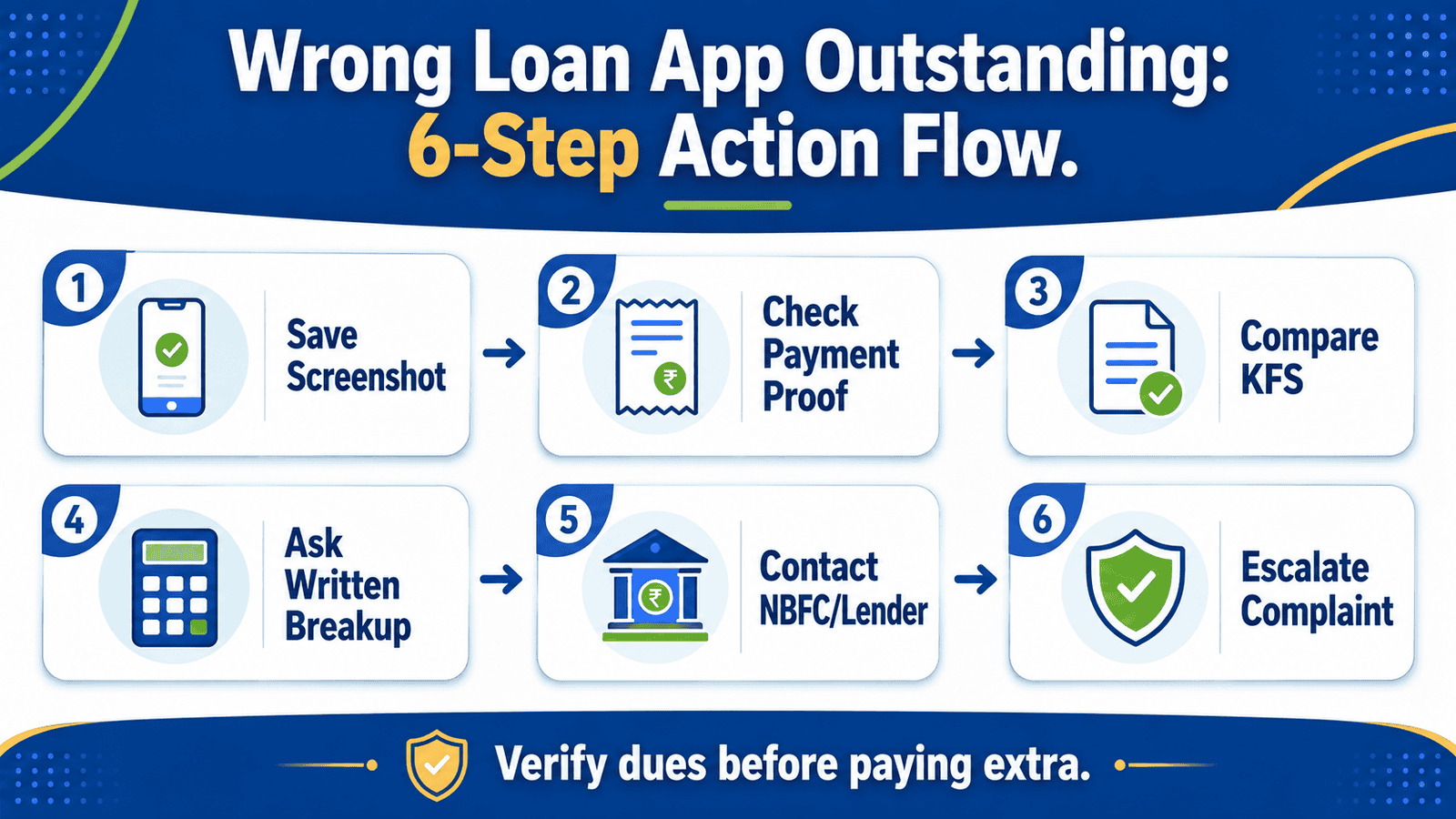
Immediate Action Steps: What to Do in the First 30 Minutes
- Take screenshots of the outstanding amount shown in the app right now — the balance can change as charges accumulate, so capture it immediately with date and time visible.
- Download or save your repayment receipt from the UPI app, net banking, or payment gateway — note the UTR or reference number, amount debited, and the payment date.
- Find your loan ID and the actual lender or NBFC name — this is usually in the KFS, sanction letter, or SMS you received when the loan was approved. The app name is often not the lender name.
- Email the lender or app support with your loan ID, UTR number, payment screenshot, and bank debit entry — do not rely only on phone calls, as written records matter if you escalate later.
- Do not share your OTP, PIN, Aadhaar image, or PAN image in response to any message claiming to resolve the dues issue — legitimate lenders do not ask for this to update a payment.
- Do not transfer money to any personal account, UPI ID, or unofficial payment link — only use the official repayment method shown in the original loan agreement or app.
Key Facts at a Glance
| Issue Shown in App | Possible Reason | Proof to Check | Whom to Contact | Risk Level |
|---|---|---|---|---|
| Balance not updated after payment | Payment reconciliation delay (1–3 business days typical) | UTR/reference number, bank debit entry | App support or payment gateway | Low if UTR confirmed |
| Extra charge added after payment | Late fee, bounce charge, GST, or penal charge | KFS, repayment schedule, sanction letter | Lender/NBFC in writing | Medium — check if disclosed |
| Amount much higher than expected | Undisclosed charge, wrong loan ID, or technical error | KFS, total repayment column, payment history | Lender/NBFC grievance officer | High — request written breakup |
| Loan shows as open after full payment | Closure not processed, admin delay, or system error | Full repayment receipt, loan closure letter | Lender/NBFC, then RBI CMS if unresolved | High — can affect CIBIL report |
| Threats or demands from unknown contacts | Unauthorised recovery agent or fake app behaviour | Screenshot threats, check lender name in KFS | Cybercrime portal, Sachet, RBI | Very High — do not pay |
Why Your Loan App May Show a Wrong Outstanding Amount
Not every mismatch is fraud. Understanding the possible reasons helps you stay calm and respond correctly. According to RBI’s guidelines on digital lending, regulated entities and their Lending Service Providers (LSPs) are required to maintain transparent records of loan disbursement, repayment, and outstanding balances — but technical systems are not always instant.
Step 1 — Payment Reconciliation Delay
When you pay through UPI, net banking, or a payment gateway, the money reaches the lender’s system through an intermediary. This process can take one to three business days depending on the payment gateway and the lender’s internal reconciliation cycle. Your bank shows a debit immediately, but the app may not reflect the credit until the funds are confirmed on the lender’s side. This is the most common and least alarming reason for a balance not updating after payment.
Step 2 — Disclosed Charges Added After Payment
Your loan app may add a late fee, bounce charge, GST on charges, or a penal interest if an earlier EMI was missed or bounced before your most recent payment. If these charges were clearly mentioned in your Key Fact Statement (KFS) or loan agreement at the time of sanction, they are technically valid — even if the timing feels confusing. A KFS is the standardised one-page summary that every digital lender in India is required to provide before disbursement, listing the loan amount, Annual Percentage Rate (APR), net disbursal amount, total repayment amount, and every charge payable. You can compare charges in KFS to verify which fees were disclosed upfront. The understand APR on digital loans page explains how to identify whether the total cost shown in the app matches the APR you agreed to.
Step 3 — Wrong Loan ID, Duplicate Entry, or Technical Error
Some borrowers with multiple short-term loans from the same app see balances from a different loan ID appear on their active account view. This is a technical error, not fraud — but it is still a dispute that requires written resolution from the lender. If you have only one active loan and the balance does not match any repayment scenario you can calculate, ask the lender for a full loan statement showing every transaction against your specific loan ID.
Step 4 — Undisclosed or Unexpected Charges
If the additional amount shown was never mentioned in your KFS, sanction letter, or repayment schedule, that is a dues dispute. Under RBI’s Digital Lending Directions, a regulated lender or LSP is not permitted to charge you anything that was not clearly disclosed before disbursement. Charges that appear without prior disclosure in writing are the strongest basis for a formal complaint to the lender/NBFC grievance officer or, if unresolved, the RBI Complaint Management System.
Step 5 — Suspicious App or Unauthorised Lender
If the app has no identifiable NBFC or bank listed as the lender, no KFS was ever shared with you, or the threats and demands are coming from unofficial numbers and WhatsApp messages, this may be an unregistered or fake loan app. This is a separate problem that requires safety steps beyond a normal dues dispute. If this is your situation, scroll directly to Section 11 before continuing.
Real Example: Rahul’s ₹10,000 Digital Loan — Illustrative
The following is a fictional illustrative scenario. Numbers and lender terms vary — this is not a representation of any specific app, NBFC, or bank.
Rahul, 29, a sales executive from Pune earning ₹38,000 per month, took a ₹10,000 short-term digital loan through a lending app for a medical emergency. His KFS showed a net disbursal of ₹9,500 after a processing fee of ₹500, with a total repayment of ₹10,800 over two EMIs. His first EMI of ₹5,400 was paid on time. His second EMI of ₹5,400 was paid through UPI — bank debit confirmed, UTR number saved — but the app continued to show ₹8,500 as outstanding for three days, then updated to ₹1,800 without explanation.
When Rahul emailed the lender’s support address with his loan ID, UTR number, and payment screenshot, the lender replied that the ₹1,800 was a late fee for his first EMI, which had arrived one day after the due date. Rahul checked his KFS — the late fee clause was present. He did not like it, but he now understood what the charge was and why it existed. He paid the ₹1,800 with a clear written record of what it was for.
The key insight: the outstanding amount was not entirely wrong — but it was unexplained. A written breakup from the lender turned a confusing scare into a manageable, documented payment. You can understand APR on digital loans to see how even small charges compound into a higher effective cost than the headline rate suggests.
Before You Complain, Collect This
To raise a complaint that the lender/NBFC or regulator can act on, you need specific documents. Vague complaints without evidence are difficult to resolve. Check if the app is RBI linked to identify the actual regulated lender behind the interface — this name must appear in every formal complaint you submit.
| Proof Item | Where to Find It | Why It Matters |
|---|---|---|
| Loan ID | App dashboard, sanction SMS, KFS document | Links every communication to your specific loan account |
| Lender / NBFC name | KFS, sanction letter, app “About” or loan agreement section | Tells you who the regulated entity is — the app may just be an LSP interface |
| KFS or sanction letter | PDF shared at loan approval, email, or in-app document section | Official record of APR, charges, and total repayment you agreed to |
| Repayment receipt / UTR number | UPI app, net banking transaction history, payment gateway email | Proves payment was made and gives the lender a reference to trace the credit |
| Bank statement debit entry | Net banking statement or bank app transaction list | Confirms the exact amount debited, date, and destination account/VPA |
| App screenshots (with date/time) | Screenshot the outstanding balance screen, payment history screen, and any message from the app | Documents the wrong balance at a specific date so the lender cannot later claim it was always correct |
| Email or chat communication trail | Email inbox, in-app support chat, SMS history | Shows what the lender said in response — useful if the complaint escalates |
How to Calculate Whether the App’s Demand Is Correct
Before accepting or disputing the outstanding amount, run a simple comparison using your KFS. The KFS must show: sanctioned amount, net disbursal (after processing fee), APR, repayment schedule (each EMI amount and due date), and total repayment amount. Use this structure:
Expected Outstanding = Total Repayment Amount (from KFS) − Amount Already Paid (verified by bank debit)
Where: Total Repayment Amount = Principal + Interest + Disclosed Charges | Amount Already Paid = Sum of all bank-confirmed debits for this loan ID
If the app’s outstanding demand is higher than this calculation, the difference is either an undisclosed charge, a reconciliation delay, or a system error — all of which require a written explanation from the lender before you pay.
App Balance vs KFS vs Bank Proof: Side-by-Side Check
| Item | What App Shows | What KFS / Statement Shows | Mismatch Note |
|---|---|---|---|
| Loan amount sanctioned | Check app loan details screen | Sanctioned amount in KFS | Should match — flag if different |
| Net disbursal amount | Amount credited to your bank | Net disbursal after fees in KFS | Processing fee difference is normal if disclosed |
| Total repayment | Sum of all EMIs shown in app schedule | Total repayment column in KFS | If app total exceeds KFS total, this is a dispute point |
| Late fee / penal charge | Extra line item in outstanding breakup | Charge schedule in KFS or loan agreement | If not in KFS, ask for written authority to charge |
| Amount paid (your proof) | Repayment history in app | Bank statement debit entries, UTR numbers | If bank shows debit but app does not show credit, report UTR to lender |
| Current outstanding | Balance shown on app home screen | Expected balance = KFS total − payments made | Difference = disputed amount needing written explanation |
How to Classify Your Situation Before Escalating
| Situation | Possible Reason | What to Check | Next Action |
|---|---|---|---|
| App balance unchanged 1–3 days after payment | Payment gateway reconciliation delay | UTR number confirmed in bank app | Wait 3 business days, then email lender with UTR |
| Extra charge added, shown separately in breakup | Late fee, bounce fee, GST — disclosed in KFS | KFS charge schedule, due date of original EMI | Verify charge in KFS; pay if disclosed, dispute if not |
| Amount higher than KFS total repayment | Undisclosed charge, wrong loan ID, or system error | KFS total repayment, full payment history | Request written dues breakup from lender/NBFC in writing |
| Loan shows active / open after confirmed full payment | Closure not processed, admin delay | Full repayment receipt, loan closure confirmation | Email lender for NOC and closure confirmation; escalate if no response |
| Threats, abusive messages, demands to pay to unknown account | Unauthorised recovery or fake/illegal app behaviour | Lender name in KFS, RBI regulated entity list | Do not pay; report to cybercrime.gov.in, Sachet, and RBI; screenshot all threats |
If you are unsure whether the app is connected to a legitimate lender, identify fake loan apps before taking any further payment action. Sachet (sachet.rbi.org.in) is the RBI’s portal for reporting suspicious or unauthorised financial entities.
How to Escalate Your Complaint: Step by Step
Step 1 — Contact App Support in Writing
Use the in-app support ticket, email address, or registered complaint channel. State your loan ID, payment date, UTR number, amount debited, and the outstanding balance shown. Ask specifically: “Please provide a written breakup of all charges included in the current outstanding amount and confirm whether the payment reference [UTR] has been received and applied.” Save all responses.
Step 2 — Contact the Actual Lender or NBFC’s Grievance Officer
If the app support does not resolve the issue, contact the actual regulated lender or NBFC listed in your KFS. Every regulated entity is required under RBI guidelines to have a Grievance Redressal Officer (GRO) whose name and contact must be accessible to borrowers. Submit the same complaint with evidence to the GRO in writing.
Step 3 — Escalate to RBI Complaint Management System
If the lender or NBFC does not provide a written resolution within the applicable complaint period, you may escalate to the RBI Complaint Management System (CMS) at cms.rbi.org.in. This applies to regulated entities — banks and RBI-registered NBFCs. You will need your loan ID, lender name, evidence of the complaint sent to the lender, and the lender’s response or non-response. You can file an RBI complaint with full details of what documents to submit and which category to select.
Step 4 — Use Sachet or Cybercrime Routes for Suspicious Apps
If the app is not clearly linked to a registered lender, uses threats, demands payment to personal accounts, or accessed your contacts and gallery without consent, report to sachet.rbi.org.in for suspicious financial entities and cybercrime.gov.in for criminal behaviour including extortion, harassment, and data misuse.
| Step | Whom to Contact | What to Send |
|---|---|---|
| 1 | App support / in-app grievance | Loan ID, UTR, payment screenshot, bank debit entry, outstanding screenshot |
| 2 | Lender/NBFC Grievance Redressal Officer | Same as above + KFS, prior complaint reference, written dues breakup request |
| 3 | RBI CMS (cms.rbi.org.in) | Evidence of complaint to lender, lender name, loan ID, non-resolution proof |
| 4 | Sachet (sachet.rbi.org.in) or cybercrime.gov.in | App name, screenshots of threats/demands, lender name if known, evidence of abusive behaviour |
What Not to Do When Your Loan App Shows a Wrong Amount
Do Not Pay the Extra Amount Without a Written Breakup
If the app shows an amount higher than your KFS total and you cannot identify what the extra charge is for, paying it without a written explanation weakens your position. You may still owe it — but you have the right to know what you are paying for before you pay.
Do Not Delete the App, Chat History, or Messages
Evidence inside the app — repayment history, chat logs, loan statement — may disappear if you uninstall. Take screenshots of every relevant screen before doing anything else. This applies even if the app is behaving suspiciously.
Do Not Rely Only on Phone Calls
Phone calls leave no record. Always follow up any call with an email or in-app written message summarising what was discussed and what you were told. Written communication is the only evidence that holds up in a formal complaint.
Do Not Ignore Genuine Dues
Disputing a wrong charge is not the same as refusing to pay a genuine one. If your KFS shows a late fee and you did miss the due date, that charge is likely valid. Ignoring genuine dues can lead to CIBIL reporting as overdue, which affects your credit score and future loan eligibility.
Do Not Share Personal Details to “Resolve” the Issue
No legitimate lender needs your OTP, ATM PIN, Aadhaar image, or PAN card photo to update a payment in their system. Anyone asking for these in the context of a dues dispute is not acting in your interest.
How to Decide What’s Right for You
your bank confirms the debit and you have a UTR number — then email the lender your UTR and wait 3 business days before assuming a fault. Most payment reconciliation issues resolve without a formal complaint.
the extra amount matches a charge listed in your KFS (late fee, bounce charge, GST) — then verify the charge is correctly applied and pay with a written record of what you are paying for.
the outstanding demand exceeds your KFS total repayment with no explanation — then request a written dues breakup from the lender/NBFC before making any further payment. Do not pay first and dispute later.
app support has not responded within a reasonable period — then escalate directly to the lender/NBFC grievance officer using the contact details in your KFS or loan agreement, and follow up in writing.
the lender/NBFC has not resolved your complaint through their own grievance process — then you may escalate to the RBI Complaint Management System, provided the lender is a regulated entity.
the app does not show any identifiable regulated lender name in the KFS or loan documents — do not pay further amounts through the app. Report the entity to Sachet (sachet.rbi.org.in) and cybercrime.gov.in and seek guidance from a qualified advisor before taking further action.
threats, harassment, or demands to pay to unofficial accounts begin — then prioritise your safety. Screenshot everything, do not engage, and report to cybercrime.gov.in immediately.
Common Mistakes to Avoid
Paying the Wrong Amount Again to “Clear” the Dispute
Many borrowers pay a second time hoping the balance will update, without verifying that the first payment was received. If the first payment is confirmed in your bank but the app has not credited it, paying again means you have overpaid — and recovering that overpayment requires a separate, often longer, complaint process.
Deleting the App Before Saving All Records
Once you uninstall the app, loan statements, chat history, repayment schedules, and in-app documents may no longer be accessible. Take screenshots and download every available document before considering uninstalling, even if the app is behaving in a way that feels threatening.
Only Calling Support and Not Emailing
A phone conversation is not proof of anything in a formal complaint. If the support agent promises to update your account, follow up with an email to the same team saying “As discussed on [date], you confirmed that [what was agreed].” This creates a written record that you can attach to any formal complaint.
Confusing the App Name With the Actual Lender
Many digital lending apps are Lending Service Providers (LSPs) — they are the interface, not the lender. Your actual creditor is the bank or NBFC listed in the KFS. If you complain only to the app and not the actual regulated entity, your complaint may not be processed under the formal RBI grievance framework at all.
Ignoring the Dues Because You Are Upset
Even when a charge is disputed, ignoring it entirely without formally disputing it in writing can result in the lender reporting you as overdue to credit bureaus. Dispute in writing — but do not simply stop paying and assume the problem will resolve itself.
Posting Loan Account Details Publicly
Sharing your loan ID, KFS, bank details, or communication trail on public social media may feel satisfying but creates a risk: your personal financial data is now public, and it may complicate a formal complaint if the lender can argue that confidentiality was breached.
When This May Not Be the Right Choice
Disputing an outstanding amount through a complaint process makes sense when you have clear payment proof and a genuine mismatch. But this approach may not apply or may need a different path in these situations:
If the dues are genuinely pending — if your payment missed the due date, bounced, or was sent to the wrong account, the outstanding amount may be entirely correct. Raising a complaint in this case will not remove valid dues and may delay resolution.
If the late fee was disclosed clearly in the KFS — a charge you do not like is not the same as a charge you were not told about. If the KFS shows late charges and you triggered them, the lender is entitled to apply them.
If the credit report already shows an overdue entry — a bureau dispute requires a separate process and may take time. Fix credit report errors explains how to file a dispute with TransUnion CIBIL or other bureaus if a wrong balance has already been reported.
If a legal notice or serious harassment has occurred — a formal complaint to RBI or cybercrime is appropriate, but you may also need guidance from a qualified legal advisor before responding to any legal notice.
If any of these apply to your situation, it may be worth exploring other options before committing.
Official Rules and Where to Verify
The rules governing digital loan apps, outstanding amount disclosure, and borrower complaint rights come from the following official sources. Always verify current guidelines directly — rules can change with RBI policy updates.
- RBI — rbi.org.in: Source for Digital Lending Directions, regulated entity requirements, KFS disclosure rules, LSP obligations, repayment and servicing rules, grievance redressal mandates, and credit reporting obligations for banks and NBFCs.
- RBI Complaint Management System — cms.rbi.org.in: The official portal for filing a complaint against a bank or NBFC under the RBI Integrated Ombudsman Scheme, if the regulated entity has not resolved your grievance.
- RBI Sachet — sachet.rbi.org.in: The portal to report suspicious or unauthorised financial entities, including loan apps not linked to any RBI-regulated lender.
- National Cyber Crime Portal — cybercrime.gov.in: For complaints involving threats, harassment, data misuse, extortion, or fraud by a loan app or recovery contact.
- TransUnion CIBIL, Experian India, CRIF High Mark, Equifax India: These are private credit bureaus (not government sources) where you can check whether a wrong outstanding amount has been reported as overdue against your credit profile, and file a bureau-level dispute if needed.
Rules, rates, charges, and eligibility conditions can change. Always verify current details from the official source, lender, or relevant regulator before making a financial decision.
Expert Tips
- Keep a single folder — on your phone or email — with your KFS, sanction letter, repayment receipts, UTR numbers, and screenshots of the app balance. Label it with the loan ID so it is easy to find if a complaint reaches the NBFC or RBI level.
- Always ask for a loan statement in writing before raising a formal complaint. A lender who sends you a clear, itemised statement is easier to hold accountable than one who only communicates by call. If they refuse to provide one, that refusal is itself a point in your complaint.
- Use your loan ID in every message, email, and call reference. If you contact support and do not mention the loan ID, the agent may apply your message to the wrong account, and your evidence trail becomes muddled.
- Keep the language in your complaint neutral and factual. Write: “The outstanding amount shown is ₹X. My bank records show a payment of ₹Y on [date] with UTR [number]. Please provide a written breakup of the difference.” Avoid emotional language — it can distract from the factual dispute and make a complaint harder to process.
- After your loan is fully closed, pull your credit report from all four bureaus within 60 days. Check that the loan appears as “Closed” and not “Active” or “Overdue.” If it does not, raise a bureau dispute immediately — a closed loan that still appears open will drag your credit score lower for months.
- If you have taken multiple loans from the same app, make sure each payment clearly references the correct loan ID. A payment sent without a loan ID reference can be applied to the wrong account, creating a false outstanding balance on one loan while another is overpaid.
Frequently Asked Questions
Why is my loan app showing a wrong outstanding amount after payment?
The most common reasons are payment reconciliation delay (the credit has not reached the lender’s system yet), a disclosed late fee or bounce charge added to your balance, a wrong loan ID mapping, or an undisclosed charge. Wait three business days after a confirmed payment before escalating, and compare the app balance with your KFS total repayment to identify a genuine discrepancy.
Should I pay the extra amount shown by the loan app?
Not until you know what the extra amount is. Ask the lender for a written dues breakup that shows principal, interest, each charge, and every payment received. If the extra amount matches a charge that was clearly disclosed in your KFS, it is likely valid. If it has no disclosed basis, do not pay it — dispute it in writing instead.
What proof should I collect before raising a complaint?
At minimum: loan ID, lender/NBFC name, KFS or sanction letter, repayment receipt with UTR/reference number, bank statement debit entry, app screenshots of the wrong balance with date and time visible, and any written communication from the app or lender. Every item in this list strengthens your complaint.
Can a wrong loan app outstanding amount affect my CIBIL score?
Yes — if the lender reports your loan as overdue or active when it should be closed, your credit report will show that status until a correction is filed. Check your credit report from TransUnion CIBIL, Experian India, CRIF High Mark, or Equifax India after any payment dispute is resolved. If you find an error, raise a bureau dispute with documentation.
How do I complain against a loan app or NBFC in India?
First, contact the app support and the lender/NBFC grievance officer in writing with your evidence. If unresolved, escalate to the RBI Complaint Management System at cms.rbi.org.in — but only if the lender is a regulated entity (a registered bank or NBFC). For suspicious or unregistered apps, use Sachet (sachet.rbi.org.in). For threats, harassment, or fraud, use cybercrime.gov.in.
What if the app keeps adding late charges even after I paid?
Request a written statement showing every charge applied since your last payment, with the contractual basis for each charge from the KFS. If charges continue to appear without a basis disclosed in your KFS or loan agreement, this is a formal dispute. Raise it in writing with the lender/NBFC grievance officer and reference the RBI Digital Lending Directions, which require full upfront disclosure of all charges.
What should I do if the app threatens me for a wrong amount?
Do not pay. Screenshot every threatening message with the date and sender visible. Do not engage or argue back. Report the threats to cybercrime.gov.in under the relevant category (online financial fraud or harassment). If the app accessed your contacts or photos without consent, include that in your complaint. Also report the app to Sachet (sachet.rbi.org.in) if it does not appear linked to a registered lender.
Is there a difference between complaining to the loan app and complaining to the NBFC?
Yes — a significant one. The loan app may be an LSP (Lending Service Provider), which is an intermediary. The actual lender — the bank or NBFC — is the regulated entity responsible for your loan under RBI rules. A complaint to the app alone may not be processed under the formal regulatory framework. Always identify the actual lender from your KFS and direct your formal complaint there.
Final Verdict
If your loan app is showing a wrong outstanding amount after payment, your first move is evidence, not payment. Save screenshots, find your loan ID, download your repayment receipt and bank debit proof, and compare everything against the KFS total repayment that was agreed before disbursement. Most mismatches are either a short payment reconciliation delay or a disclosed charge — both of which become clear once you have the written dues breakup from the lender in hand. If the amount cannot be explained by your KFS terms and the lender does not provide a clear written response, the complaint escalation path through the lender/NBFC grievance officer and then the RBI Complaint Management System is your right as a borrower with a regulated lender. For apps that show no identifiable lender, demand payment to unknown accounts, or use threats, the correct route is cybercrime.gov.in and Sachet — not further payment.
Always verify the latest rules, charges, and terms from the relevant official source or provider before making a financial decision.
This article is for educational purposes only and should not be treated as personalised financial, credit, tax, or legal advice. Rules, rates, charges, eligibility criteria, and product terms can vary by provider and may change over time. Please verify current details from official sources, the relevant provider, or a qualified professional before making any financial decision.

Arjun writes clear borrower-safety guides on digital loan apps, RBI digital lending rules, KFS, APR, LSPs, loan app harassment, cybercrime complaints, CIBIL impact, and safer borrowing choices. He focuses on helping Indian borrowers understand risks, protect their data, compare lenders carefully, and use official complaint channels when needed.